The 7 Best Intercom Alternatives and Competitors in 2026



Intercom is a robust help desk that lets you deliver omnichannel support and has AI baked into nearly every feature of the platform. However, its pricing is too high for many businesses, some features are only available as add-ons with additional costs, and many customers find its AI features don't always work well.
If you're looking to replace Intercom, this list of the seven best Intercom alternatives will help you find the perfect fit. We've reviewed each platform in great detail, sharing what types of teams and businesses they're best suited for, looking at how their features and pricing compare to Intercom’s, and explaining what you'll gain (and lose) when making the switch.
| Software | Overview | G2 Rating | Free Trial | Starting Price |
|---|---|---|---|---|
Help Scout | Help Scout is just as feature-rich as Intercom but much more affordable, and its AI features require far less setup and ongoing optimization to work properly. | 15 days | Free plan available; paid plans start at $25/user per month | |
HelpCrunch | HelpCrunch is a combined support tool and email marketing platform that's great for support and marketing collaboration. | 14 days | $12/team member per month | |
HubSpot Customer Platform | HubSpot is a robust help desk, CRM, and marketing automation tool for teams that want to collaborate across departments. | 14 days | Free plan available; paid plans start at $15/seat per month | |
Userflow | Userflow is a digital adoption platform that can be used as an alternative to Intercom's in-app product tour feature. | 14 days | $240 per month (includes three users) | |
Tidio | Tidio is a help desk with a video calling feature that's included in the base cost of the platform (rather than an additional cost). | $24.17 per month (includes 100 conversations) | ||
Zendesk | Zendesk is a robust, enterprise-ready platform that's a good alternative for teams looking for a one-to-one replacement. | 14 days | $19/agent per month (limited to email and social channels) | |
Kustomer | Kustomer is great for retail businesses due to its ecommerce and social media integrations and omnichannel capabilities. | Not available | $89/seat per month |
Why look for alternatives to Intercom?
Intercom's customers commonly report running into the following issues with the platform:
Intercom's pricing is high for small businesses. Upgrading from its base plan to its mid-tier plan to get access to features like workflows, routing, and Facebook/Instagram integrations will nearly triple your per-user costs. Additionally, Fin's per-resolution rates are among the highest in the market, and most of its AI features are sold as add-ons that increase your price even more.
Fin — Intercom's AI agent — struggles with complex use cases. Customers feel the answers it provides are sometimes too generic, too improvised, robotic sounding, or just plain wrong, and it's not always clear how to make improvements to its answers. Additionally, setting Fin up and making minor adjustments to its workflows requires a lot of manual effort.
Many customers take issue with how they're billed for resolutions by Fin, stating that it assumes conversations were resolved that actually weren't, then charges for those "resolutions" anyway.
Taking advantage of Intercom's more complex AI features like Fin Tasks — which updates data as needed in your proprietary and third-party systems (e.g., canceling orders in Shopify when requested by a customer) — is extremely complex and requires development support.
The handoff process from Fin to human agents isn't very smooth. One customer reports that Fin doesn't always follow through with the request, there's a slight delay before the conversation is assigned to an agent, and if a customer sends a reply before the conversation is reassigned, Fin starts responding again.
The 7 best Intercom competitors and alternatives
Below, you'll find our detailed reviews of the seven best Intercom alternatives. We've reviewed each platform in detail, specifying which types of teams, use cases, and companies they're best for and explaining how they're different from and similar to Intercom.
1. Help Scout – Best for SaaS support teams

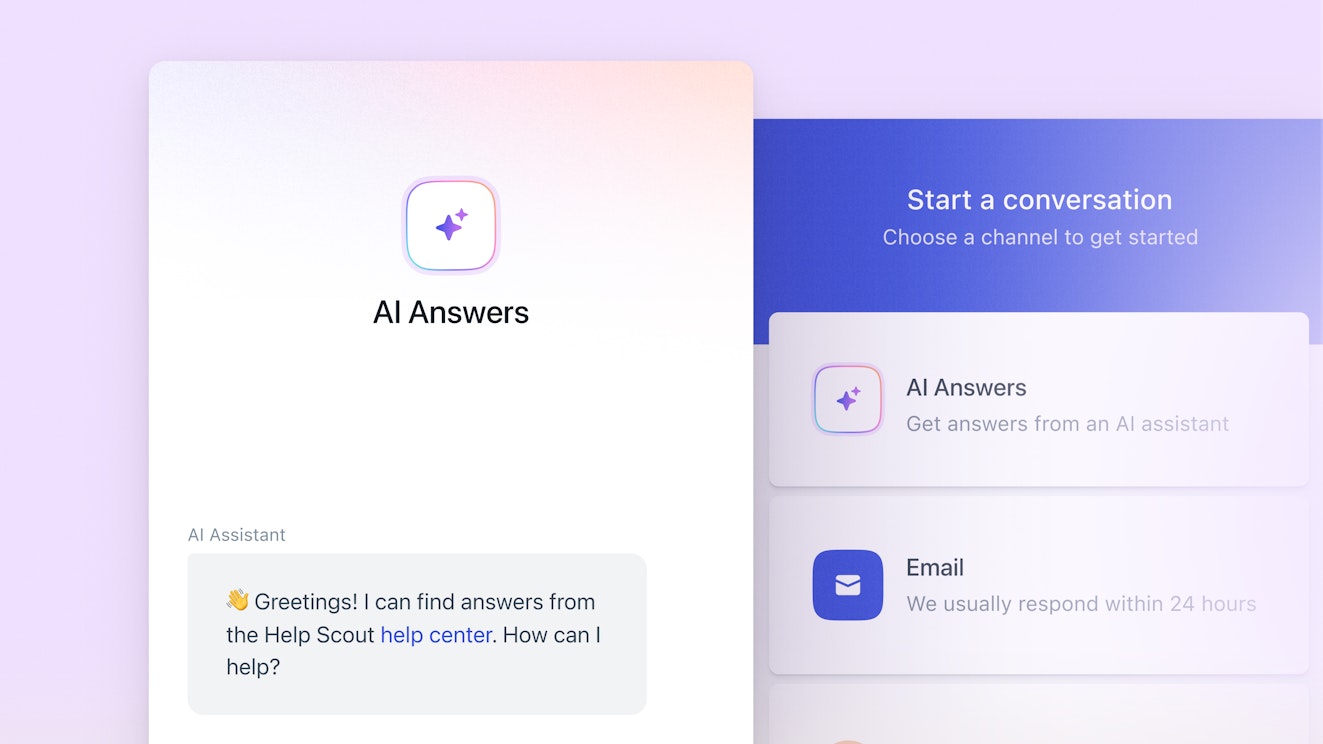
Help Scout's customer support platform offers all of the power of Intercom at a fraction of the price. It comes with all of the tools you need to deliver exceptional support: a shared inbox, a knowledge base builder, a live chat widget, social media integrations, collaboration tools, proactive support features, and AI that's designed to make your team more effective — not replace them.
Recommended Reading


How Help Scout compares to Intercom
Help Scout is much more affordable than Intercom; you’ll pay as much as $57 less per user on Help Scout’s plans than on Intercom’s. Additionally, Help Scout’s AI chatbot feature has a lower per-resolution cost than Intercom's Fin.
Both tools let you deliver email, self-service, live chat, and social support. For channels like SMS and phone, Help Scout integrates with other SaaS products, while Intercom offers these channels natively (with additional costs).
While Fin can answer customer questions received on any channel, Help Scout's AI Answers only works through its embeddable web widget, Beacon.
Help Scout's handoff process from chatbot to agent is simpler and more intuitive than Intercom's. Customers have to explicitly request AI assistance in Beacon, and getting help from a human is always just one click away.
AI features

AI tools should empower support teams to do their best work and get a little time back in their day to focus on more valuable tasks that can improve the customer experience. Help Scout has four AI features that do just that:
AI Drafts uses generative AI, the content from your help center, and past customer conversations to draft accurate replies to customer messages. Simply review, edit if needed, and hit send.
AI Summarize breaks down long conversation threads into a few bullet points, allowing you to get up to speed on cases more quickly.
AI Assist helps you polish customer replies and Docs articles by adjusting length or tone, checking for spelling and grammar issues, or translating the text with a single click.
AI Answers is an AI-powered chatbot that answers customers' questions for you.
Help Scout's AI Answers feature is fine-tuned on the content from your knowledge base and any websites you add so that it not only provides accurate answers but also sounds like you wrote them yourself. But don't take our word for it. Watch the video below to see how one customer who was skeptical of AI agents changed his opinion completely after seeing AI Answers in action.
If you do find questions that AI Answers weren't able to resolve in your reports, it's incredibly easy to provide the right information for future questions on the same topic.
AI Answers is distinctly identified as AI-provided support in the web widget so customers are never confused about who they're talking to, and if they can't find the answers they need (or just don't want to get help from AI), they can reach your team via email or live chat in one click from the same widget.
Help desk

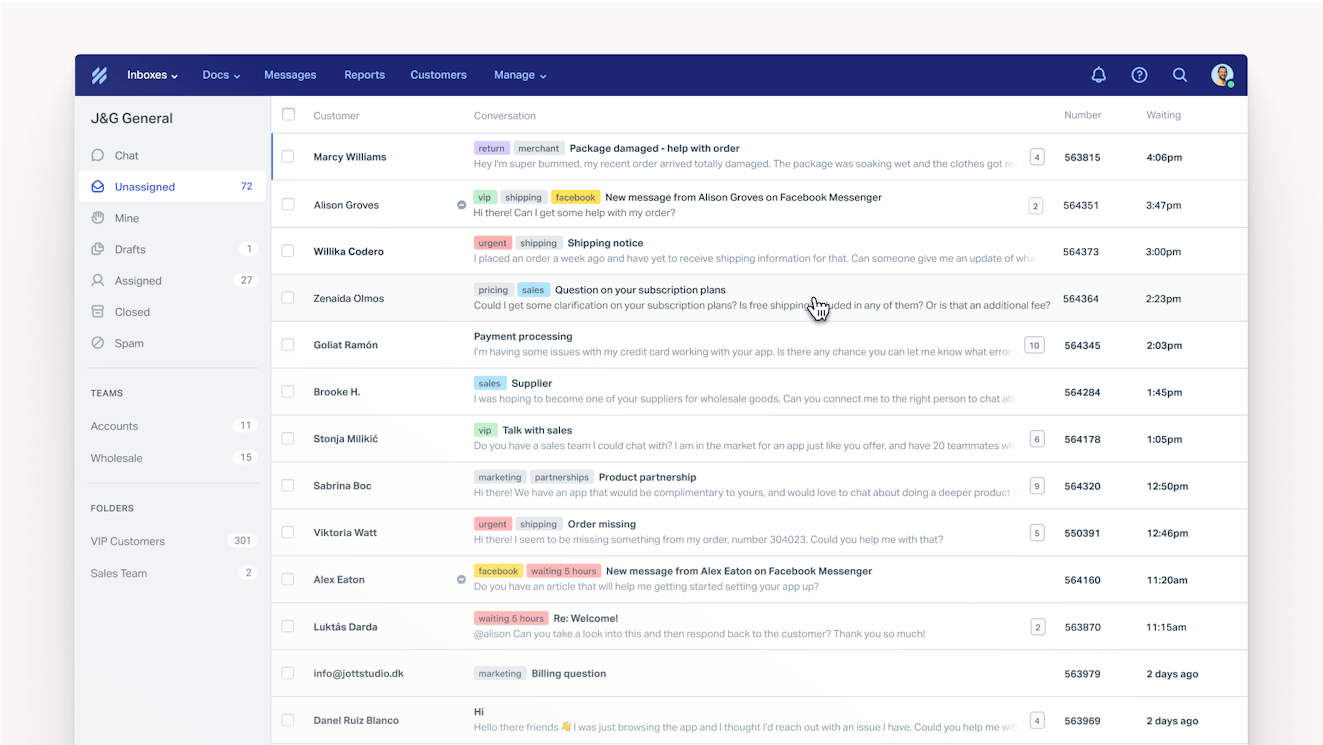
Help Scout's shared inbox makes it easy to collaborate on incoming conversations across all of your channels (email, live chat, and social media). It has everything you need to do your best work, including:
The ability to send private notes and tag a team member in a conversation.
A searchable library of saved replies to streamline responses to common questions.
Tags, custom fields, views, and automatic workflows to keep you organized and reduce busy work.
The ability to snooze a conversation or schedule your reply to send later.
Collision detection to prevent accidental duplicate replies.
Keyboard shortcuts to help you navigate your queue with ease.
Customer profiles to provide you with key customer information in the conversation sidebar so that your replies are always personalized and relevant.
In addition, iOS and Android apps are available if you need to respond to customers while on the go.
Knowledge base


Help Scout's knowledge base tool, Docs, is available on all of its plans. Docs makes it easy for you to get all of the information your customers need — things like answers to FAQs, troubleshooting guides, and company policies — published in a matter of minutes. With Docs you can:
Build and launch a personalized help center.
Create media-rich knowledge base articles quickly and easily.
Customize your help center to fit your brand personality.
Monitor article performance and spot content gaps via a dedicated reporting dashboard.
Proactive support
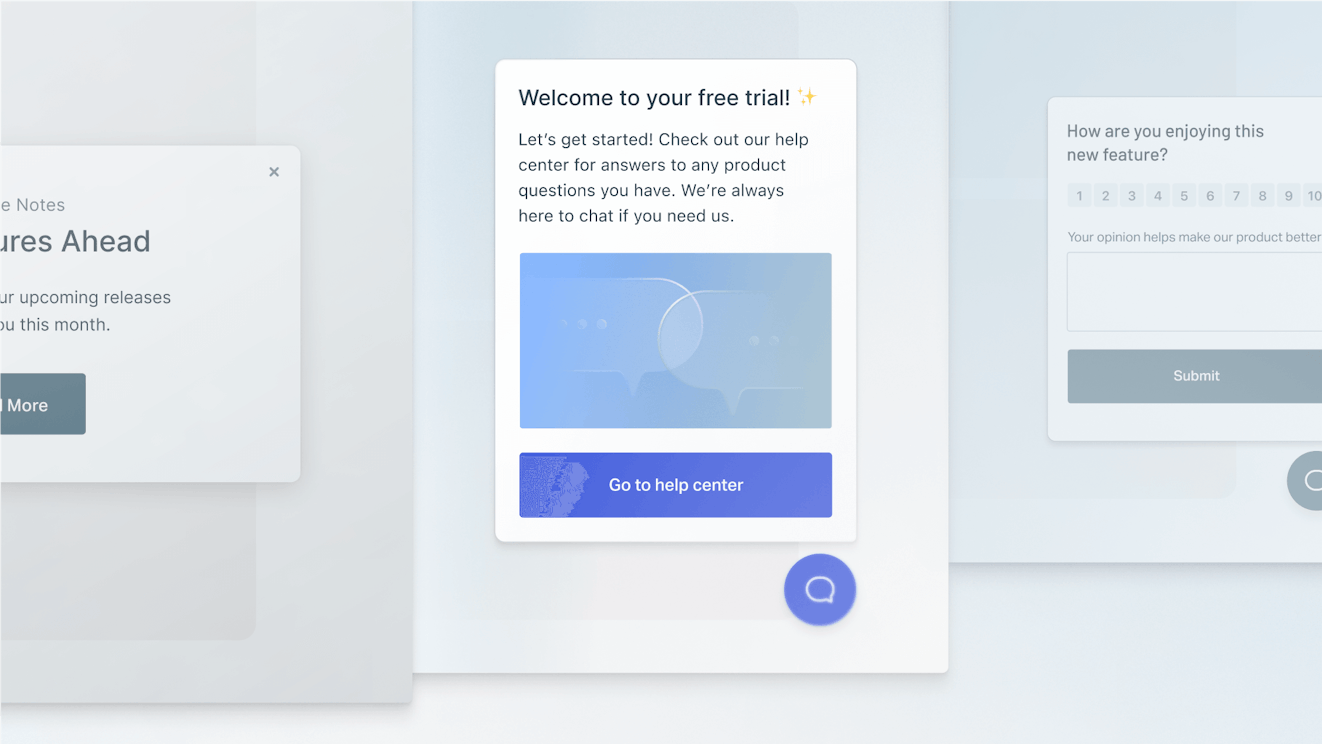
Help Scout's web widget, Beacon, can be embedded on any web page or within your app to provide your customers easy access to live chat. In addition to being a chat hub, Beacon is a great way to reach out to your audience in between email, live chat, and social media sessions.
With Beacon you can:
Deliver proactive customer service by surfacing a chat window or support article to improve customer engagement and help customers through tricky spots in your interface.
Send targeted messages to segments of your audience that are triggered by criteria like time on page and scroll behavior.
Collect feedback through NPS and customer satisfaction surveys.
Integrations
Help Scout offers integrations with popular platforms like Shopify, Salesforce, HubSpot, Slack, and Jira. Don’t see the integration you’re looking for? Use the API and create your own!
Reports and analytics
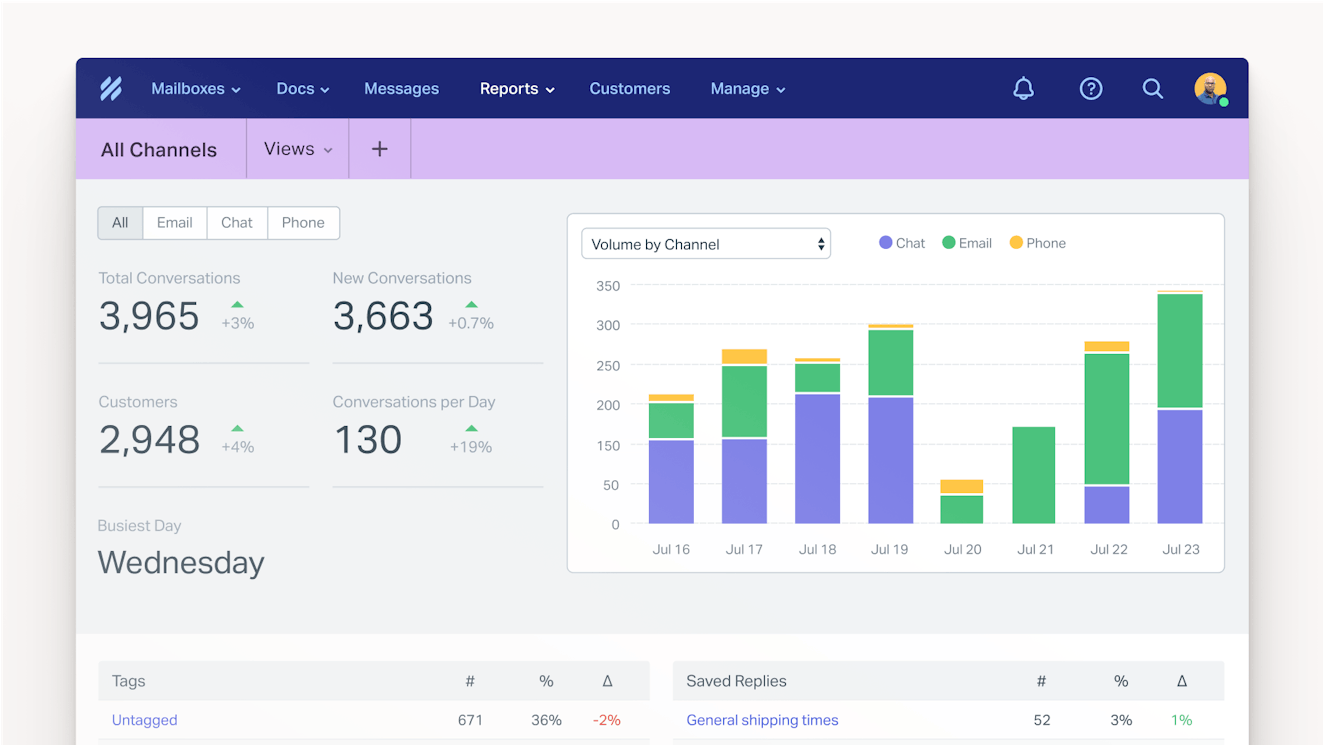
To make sure your team can measure success and identify areas of improvement, Help Scout has reporting dashboards that help you track metrics like conversation volume, channel usage, team performance, customer satisfaction, and more.
Want to track something else? No problem! You can create your own filters based on tags, custom fields, or views so that you can report on what matters most to you.
Migrating from Intercom to Help Scout
Help Scout offers automatic migration from Intercom to Help Scout using Import2, and the service is completely free for most customers. Import2 will migrate all of your tickets/emails, tags/labels, and customer profiles from Intercom to Help Scout.
Pricing
Free plan and trial available. View Help Scout's current pricing.
Learn more about Help Scout:
2. HelpCrunch – Best for marketing-focused features


HelpCrunch is an interesting alternative to Intercom because it's a combined customer support and email marketing platform, which may make it a good option for teams migrating away from Intercom after it pivoted from a more marketing- and sales-focused tool to a support-focused one. In addition to its help desk features, Help Crunch lets you build email sequences and engage visitors and users proactively.
How HelpCrunch compares to Intercom
HelpCrunch is significantly less expensive than Intercom. Its base plan is less than half the per-user cost of Intercom's lowest-cost plan.
HelpCrunch's base and mid-tier plans can only be used by up to 20 team members; you have to be on the Unlimited plan to add more than 20 users. Intercom does not limit the number of users you can add to any of its plans.
Both tools have proactive messaging and outbound emailing features that can be used by sales, support, and marketing teams alike.
Both tools let you deliver email, chat, and social support and build a knowledge base. However, while Intercom also offers native phone and SMS support, HelpCrunch only offers those channels via integrations, and its available integrations for those two channels are very limited.
Key features
From a customer support perspective, HelpCrunch lets you manage email, chat, and social media support in a shared inbox. For social media support, HelpCrunch integrates with Facebook Messenger, WhatsApp, Instagram, Telegram, and Viber, and it also integrates with Aircall for phone support and Twilio for SMS support. Customers can see all of your support options in HelpCrunch's embeddable web widget.
Its shared inbox comes with customer profiles so you can deliver personalized support, manual assignments and automated routing so you can get things to the right place, and private notes to make collaborating with teammates easier. You can also take advantage of HelpCrunch's AI features to clean up replies you've written, translate them into other languages, or lengthen/shorten your responses.
Where HelpCrunch really stands out, however, is with its more marketing-focused features. You can use the tool to build lists, send one-off newsletters and product updates, or build email nurturing sequences. Additionally, you can build Popups — messages that are triggered based on criteria you set — to encourage site visitors to make a purchase, offer onboarding help to users in your app, and much more.
Finally, HelpCrunch's AI chatbot can be used by support, sales, and marketing teams alike. It can reply to questions from customers who reach out via live chat or a messaging app — which is great for the support use case — and it can also pre-qualify leads for you using sequences you’ve built in HelpCrunch's no-code chatbot builder, which is great for the sales and marketing use case.
Migrating from Intercom to HelpCrunch
HelpCrunch will migrate your Intercom data (contacts, tags, saved responses, email templates, and website auto messages) into their system for free. They can also migrate your knowledge base articles and Popups, though you will have to pay a fee for that specific service.
Pricing
Free trial available. View HelpCrunch's current pricing.
3. HubSpot Customer Platform – Best all-in-one support, sales, and marketing tool


While HelpCrunch's support platform has some features that let your support, sales, and marketing teams collaborate in the same platform, it's very basic when compared to HubSpot's Customer Platform. HubSpot comes with every feature your team could ever want from a help desk, CRM, and marketing automation platform, making it a great option for teams looking to consolidate tools and collaborate across departments.
How HubSpot Customer Platform compares to Intercom
While Intercom is a help desk with a few features that are useful for sales and marketing teams, HubSpot is a complete help desk, CRM, and marketing automation platform that lets all three departments manage all of their work in the same system and collaborate together.
Unlike Intercom, HubSpot Customer Platform offers a free plan that can be used by small teams that only need to add a max of two users. It also has a low-cost Starter plan that's less expensive than Intercom's base plan, but the features of HubSpot's Starter plan are more limited.
HubSpot's help desk tool and Intercom both let you create customer portals, which is a rarer feature found in support software, so HubSpot is a good alternative if customer portals are a must-have feature for your support team.
While HubSpot's marketing platform is robust, it doesn't offer a product tour feature like Intercom's.
Key features
HubSpot Service Hub — its help desk platform — is included in the company's Customer Platform alongside its Marketing Hub (marketing automation) and Sales Hub (CRM). It's ideal for customer success teams who need to collaborate closely with marketing and sales on campaigns, renewals, and cross- and up-sell opportunities in addition to providing general customer support.
Because all of HubSpot's systems are integrated, customer success managers will be able to see all interactions sales and marketing had with customers, including back-and-forth one-on-one emails as well as nurturing emails and newsletters received. Additionally, you'll be able to see any contracts that sales uploaded into the system to grab data like renewal dates and terms of the deal.
In HubSpot's customer success workspace, you can view your book of business and see health scores for each customer to easily identify churn risks. You can determine what types of actions add to and reduce health scores, such as submitting a support request or leaving poor feedback in an NPS survey. Finally, you can also use the tools in Marketing Hub to create onboarding email sequences for new customers.
As far as HubSpot's more general help desk features, you can manage support requests from email, live chat, Facebook Messenger, and phone; build a help center (only on the Professional and Enterprise plans); and create portals for specific customers. You'll also be able to create highly customized dashboards featuring the reports and data that are most important for your team to monitor.
Migrating from Intercom to HubSpot
HubSpot does not offer any prebuilt migration tools for importing your Intercom data into its system. However, paid migration services are available through HubSpot's Replatforming Team, a variety of HubSpot partners, and the third-party service Help Desk Migration.
Pricing
Free plan and trial available. View HubSpot's current pricing.
Recommended Reading

4. Userflow – Best for product tours


As far as help desks go, Intercom's most unique feature is its product tours; it's not a feature you'll find in other customer support tools. If you're looking for a replacement for Intercom and need to recreate your product tours, you'll likely have to sign up for separate help desk and product tour tools. For product tours, Userflow is a great option for building guided flows, checklists, surveys, and more.
How Userflow compares to Intercom
Intercom is a help desk that includes product tour features. Userflow is a product adoption platform with an interactive tour builder and other in-app guidance features, but it's not a help desk.
Both products let you build and launch in-app product tours, checklists, tooltips, AI chatbots, proactive messages, and surveys.
Both tools let you display your knowledge base in an in-app widget, but Intercom will only display your Intercom knowledge base while Userflow can display a knowledge base from Intercom, Zendesk, or HubSpot.
Userflow has some AI features to help you build tours more quickly (such as auto-translation) and improve your existing tools (such as a copy-polisher). Intercom's in-app guidance tools do not have any AI features.
Key features
Userflow is a product adoption platform that helps you build customized, dynamic, and — most importantly — no-code onboarding tours and interactive tutorials. You build them simply by clicking through your product, and Userflow turns it into a draft tour that you can then edit using the platform's drag-and drop interface. When you're finished, just copy and paste the code into your app, and you're ready to go.
In addition to product tours, Userflow has a lot of other features. You can add tool tips in your app, create checklists for onboarding tasks, embed access to your knowledge base, send users proactive messages and surveys, and even launch an AI chatbot. Other AI features available in Userflow help you polish your copy and translate your tours into other languages.
Userflow also gives you a couple of tools to draw attention to and explain new product features. You can create a hotspot — a pulsating button that, when clicked, provides a tooltip explaining the feature with a button linking to a product tour — or you can auto-start a product tour when a user takes a specific action in your app, such as clicking the link to a newly released feature.
Migrating from Intercom to Userflow
There are no automated options for migrating your existing product tours and other in-app guidance features from Intercom to Userflow, so you'll have to manually migrate any tours, messages, checklists, etc. that you want to keep.
Pricing
Free trial available. View Userflow's current pricing.
5. Tidio – Best for video chat

Tidio is a help desk that teams can use to manage customer requests from email, live chat, WhatsApp, Facebook Messenger, and Instagram. If you’re interested in live video chat, Tidio has you covered there, too.
How Tidio compares to Intercom
Tidio's pricing is usage-based, whereas Intercom's is user-based. This can make Tidio more affordable if you get a low volume of requests but have a large support team, or it could make Intercom more affordable if you have a small team managing a large volume of requests.
Where Intercom has multiple AI features, Tidio only offers two: an AI chatbot that answers customers' questions for you and an AI copilot that can write draft replies for agents.
When it comes to AI chatbots, Tidio's per-resolution rates are lower than Intercom's.
Both tools let you deliver email, chat, video, and social support. However, you can build a knowledge base in Intercom but not in Tidio, and Intercom also has built-in options for phone and SMS support, while Tidio doesn't offer these channels at all — not even via an integration.
Key features
Tidio's most unique feature is its ability to let you initiate video calls with prospects and customers from its web widget. Only agents are able to start a video call, customers can choose to accept or decline it, and both call participants have the option to turn their cameras on or off. While you can also make video calls in Intercom, you'll incur a per-minute charge for them. In Tidio, video calling is included in your base price.
For teams more focused on AI-powered chatbots like Intercom’s Fin, Tidio’s Lyro AI chatbot is worth a look. You can train Lyro on different knowledge sources like an FAQ page or your website, and it can automate all sorts of tasks such as checking order statuses and answering basic questions. For more complex situations, you can use Tidio’s Flows feature to build chatbot flows manually.
Lyro is also unique in that you can monitor its responses in real time and jump in when necessary. This makes it a good option for teams that are interested in but skeptical of unleashing AI chatbots on customers. You can also try out Lyro for free on 50 billable conversations. If you decide you’d like to keep them, you can purchase an add-on that will give you a certain number of conversations each month.
One thing worth noting about Tidio is that it doesn't have a feature for building and publishing a knowledge base, which is a fairly standard feature of help desk software. Instead, Lyro is designed to replace the need for a knowledge base; you can feed any necessary information directly to the chatbot. If you want a more traditional help center, you'll need to purchase a standalone knowledge base platform.
Migrating from Intercom to Tidio
Automatic migration of your Intercom tickets, contacts, and macros is available to Tidio+ subscribers. However, we weren't able to find any information on Tidio's site about the Tidio+ subscription, so you'll need to contact their team for more information about that service. You can also migrate Intercom tickets and contacts into Tidio for free by downloading a CSV file from Intercom and importing it into Tidio.
Pricing
Free trial available. View Tidio's current pricing.
6. Zendesk – Best one-to-one replacement


Zendesk is a robust help desk that lets you deliver support across all possible channels and take advantage of multiple AI features, making it a good one-to-one replacement for Intercom (for everything but Intercom's in-app guidance features, which no other help desk offers). It's highly customizable, offers integrations with nearly 2,000 other tools, and even has some features that you won't find in Intercom.
How Zendesk compares to Intercom
Both Zendesk and Intercom have native tools for supporting customers by email, live chat, social media, messaging apps, SMS, and phone, and both also let you create knowledge bases and customer portals. However, Zendesk also has a feature you can use to create a community forum.
Pricing for both platforms is comparable. However, Zendesk's plans have smaller jumps in pricing as you move up tiers. Moving from Intercom's base plan to its mid-tier plan is a huge jump in price.
Zendesk has integrations with nearly 2,000 apps — far more than Intercom — which makes it a better option for teams that need to integrate with niche third-party tools.
Zendesk's AI agent has a higher per-resolution cost than Intercom's Fin. However, all of Zendesk's plans give you a set number of automated resolutions as part of your plan's base price, while you'll incur charges for every resolution provided by Fin.
Key features
Zendesk is a comprehensive customer service platform that's ideal for large support teams working for enterprise companies that need deep functionality and extreme customizability. It lets you deliver support across all channels — email, chat, social, phone, and SMS — as well as build knowledge bases, customer portals, and community forums (which is a rarer feature to find in a help desk).
Like Intercom, Zendesk has also invested a lot of resources into developing AI features. Its AI agents answer customer questions over email, phone, and messaging channels and can update data in third-party systems to resolve conversations. Its copilot helps your team by automatically generating suggested replies for them and recommending actions they should take based on the user's query.
Additionally, Zendesk has an AI quality assurance add-on that analyzes 100% of the responses sent to customers (by both human and AI agents) to help you identify issues, as well as a workforce management add-on that uses AI to forecast demand and build team schedules for you. You can even use Zendesk's AI features to turn a response you sent to a customer directly into a complete knowledge base article.
One thing to keep in mind is that Zendesk's AI agents will complete tasks and answer questions over the phone as part of its default per-resolution fees, while Intercom charges separate add-on fees for both of these capabilities (Fin Tasks and Fin Voice).
Migrating from Intercom to Zendesk
Zendesk does not offer any native migration tools for importing your Intercom data into its system. However, it does integrate with the third-party service Help Desk Migration, which can do the data transfer for you for a fee.
Pricing
Free trial available. View Zendesk's current pricing.
Recommended Reading


7. Kustomer – Best for ecommerce companies


Kustomer's help desk was originally targeted to retail and ecommerce businesses, and while it's since pivoted to serve a broader market, it's still a really great platform for those types of teams. It integrates with Shopify, Magento, and Big Commerce; lets you reply to requests received via Facebook Messenger, Instagram, and WhatsApp; and serves as a combined omnichannel support solution and CRM.
How Kustomer compares to Intercom
Intercom has an affordable base plan for smaller businesses, while Kustomer does not. However, Kustomer's plans are comparably priced with Intercom's mid- and top-tier plans.
The per-seat costs listed on Kustomer's pricing page assumes you're adding at least eight seats; pricing for fewer than eight seats can only be obtained from Kustomer's sales team. Intercom does not have any minimum seat requirements.
Both platforms let you deliver support via email, chat, phone, and social (Facebook, Instagram, and WhatsApp). However, SMS support is available natively in Intercom but only available via integration in Kustomer.
Kustomer's AI agents have a lower per-resolution cost than Intercom's Fin.
Key features
Kustomer is a great platform for retail and ecommerce teams that get requests from lots of different channels. As a customer support platform, it lets you manage requests from email, chat, social, and voice as well as create internal and external knowledge bases and customer portals. However, its CRM feature is what really makes it an omnichannel support tool.
Kustomer's CRM isn't really the kind of CRM a B2B sales team would expect to use. It's probably better described as a customer data platform. It aggregates data from all of your systems — your help desk, ecommerce platform, and other integrated tools — to create detailed customer profiles that include order data, historical support conversations, customers' social media handles, and more.
Because Kustomer aggregates this data, it's able to connect support requests to customers no matter which channel they write in from. If they switch mid-conversation from live chat to voice, it will detect that and give you the context from the live chat conversation when you pick up the phone call. A timeline is generated for every customer that shows all of the conversations your team has had with that person.
Customer profile data is also used to power Kustomer's AI agents, which can answer customers' questions, process refunds, update orders, and provide details on when shipped products will arrive. You can build multiple AI agents to handle different types of tasks, and the agents can be used to respond to requests from all platforms — email, chat, social, messaging, and even voice.
Kustomer also takes a unique approach to AI copilots with its AI Assistants. There are multiple assistants designed to help with different parts of your workflow, such as analyzing data, building workflows, and creating knowledge base articles.
Migrating from Intercom to Kustomer
Kustomer does not offer any no-code tools or services for migrating to its system from Intercom. However, detailed instructions are available for migrating your data using its API.
Pricing
No free trial offered. View Kustomer's current pricing.
Recommended Reading

Choosing the right Intercom alternative for your team
As you're shopping for an alternative to Intercom, there are a few things you should look for to ensure you make the right choice:
The features you actually need: Reflect on what your goals are and which features are most important to your company. Choosing the right platform is much easier when you know what you’re looking for. Try to break down your wish list into must-haves and nice-to-haves, and avoid getting distracted by features that sound cool but won't ever be used.
Pricing that fits your budget: SaaS pricing can be confusing and vague, so make sure to spend some extra time upfront analyzing pricing tables and understanding exactly what channels and features you're getting for what you think you'll pay. Keep in mind that free trials can be deceiving, dropping you into a trial for a higher-priced plan than the one you're planning to sign up for.
Great customer support: To deliver great support, you need to get great support. Test out the support offerings of the platforms you're considering by sending in some requests during your trial. That will give you a good sense of the support you'll get as a customer.
Ease of use: Flashy features don’t mean a lot if the tool is difficult to use. Look for tools that have a quick setup and are intuitive for agents to work in. Don't get into a situation where you have to spend weeks training new team members on your support platform because no one can figure out how to use it without help.
After that, making the right choice is simply a case of seeing what other customers of the platform like and dislike about it (try asking people in your network or using a site like G2), testing different options, weighing the benefits, and seeing what works for your team. If you need more help, we have a detailed process you can follow in our Buyer's Guide to Choosing the Right Customer Support Tool.
Alexa Ahrens
Alexa is a content strategist at Help Scout, where she writes and helps other authors tell stories about customer experience, technology, and company culture. Before working in support and content creation, she worked at a wax museum — an experience that prepared her surprisingly well for a life of storytelling. Connect with her on LinkedIn.
Jesse Short
After spending a few years working as a support agent, Jesse made the switch to writing full-time. He is a Help Scout alum, where he worked to help improve the agent and customer experience.
Jessica Greene
Jessica Greene is a Help Scout alum, where we make excellent customer service achievable for companies of all sizes. Connect with her on LinkedIn or through her website.