How to Get Started With Multichannel Customer Support



Your customers expect to reach you on their terms — whether that's through email, chat, social media, or phone. But if you’ve been running a support team for any length of time, you know that adding more customer service channels isn't as simple as flipping a switch and declaring yourself multichannel.
It’s nerve-wracking, it’s stressful, and it can feel overwhelming.
If you try to launch several new channels at once, you’ll often create more problems than you’ll solve: overwhelmed support reps, inconsistent responses, and customers who still aren’t getting the help they need.
The key to effective multichannel customer support is to start small, be strategic, and build something sustainable.
This post will walk you through how to actually implement multichannel support without burning out your team or disappointing your customers. We'll cover how to choose the right channels, set realistic expectations, and measure whether it's working.
What is multichannel customer support?
Multichannel customer support is a term used to describe the process of offering customer service across multiple channels — email, live chat, phone, social media, SMS, self-service, and so on — instead of limiting yourself to just one.
The keyword here is "multiple." Once you go multichannel, you're giving customers options for how they contact you. Some might prefer the convenience of chat. Others want the thoroughness of email. Some just want to slide into your DMs when they're frustrated.
Multichannel support can be pretty basic, merely offering multiple routes to meet the customer’s preferred way to start a conversation. As it matures, it can become fully integrated omnichannel support, where customers can switch between channels mid-conversation, and the context and conversation history follows them.
The complexity you choose really is up to you and your customer base.
Why is multichannel support important?
Your customers are already everywhere, whether you're paying attention or not.
I've worked at companies where we only officially supported email, but customers were still messaging us on Instagram, commenting on Facebook posts with questions, and tagging us on LinkedIn. The support team wasn’t monitoring those channels, so those customers just didn't get help — or they got help days later when someone from marketing noticed and forwarded it. That’s not a great experience.
The reality is that customer expectations have shifted. While it’s already several years old, Microsoft's 2020 State of Global Customer Service report found that 58% of consumers use at least three different communication channels to contact customer service. Consumers are even more connected now, meaning that number has probably only gone up.
Here's what multichannel support actually gives you:
You meet customers where they already are. Some issues are better suited to different channels. When you offer multiple channels, customers can pick the right tool for their situation.
You reduce friction and improve customer satisfaction. People appreciate having options. When customers have to hunt for a way to contact you or use a channel they're uncomfortable with, you've already started the interaction on a sour note. Multiple channels remove that barrier.
You give your team flexibility in how they handle volume. When one channel gets slammed, you can route simpler questions to async channels or to self-service while keeping live support available for urgent issues. Multichannel strategies can improve workflow efficiency and response times by letting you match the channel to both the customer's need and your team's capacity.
You gain better visibility into what your customers actually need. Each channel generates data about when customers reach out, which kinds of issues come through which channels, and which channels lead to faster resolutions. When you're only on email, you're flying blind. When you're on email, chat, and social, you can spot patterns — like realizing that chat inquiries resolve 40% faster than email for a specific issue type — and adjust your customer experience strategy accordingly.
You gain a competitive advantage. If your competitors are only offering one support channel and you can effectively support several (emphasis on effectively), then you’re making it easier for people to do business with you.
How do you pick the right channels to add?
Start with the data. Look at where customers are already trying to reach you. Check your social media mentions, read through your emails for patterns, and talk to your team about what they're hearing. Your customers are probably already telling you what they need.
Think about what types of questions your support team typically handles:
Quick, simple questions like "Where's my order?" — those work great for chat.
Complex technical issues that need screenshots and back-and-forth troubleshooting? Email makes more sense.
Urgent, high-stakes problems? Phone support might be worth the investment.
Be realistic about your team's capacity. Adding chat when you're already struggling to keep up with email just means you'll be struggling on two channels instead of one.
A caveat on phone support
A lot of customers (especially in a B2C environment) will ask for a phone number for every issue they have, but phone support is incredibly complex to implement well, especially with a small team.
I've seen many more dissatisfied customers as a result of poorly implemented phone support than from not having it at all. Long hold times, undertrained agents, and poor call routing create frustration, as do overly scripted interactions and tiered systems where customers have to re-explain their issue to every new agent they reach.
That said, some issues really are better explained over the phone. If you don’t have the resources to launch full-blown phone support, consider offering phone or video support that isn't publicly advertised — something your team can offer when it makes sense. Create a Calendly link that agents can send to customers. Let customers schedule a video call to troubleshoot a SaaS technical issue; sometimes a 15-minute screen share will save hours of back-and-forth emails.
Customers are usually delighted by this approach, and your team doesn't get burned out staffing a phone line all day.
How to implement multichannel support well
Before you add new channels, make sure your foundation is solid. Ensure whatever channel(s) you already offer are running smoothly, make sure your knowledge base is in order, and confirm that your internal processes are accurately documented.
Once that’s done, here’s what I’d recommend.
1. Start with one new channel
I cannot stress this enough: Add one channel at a time. Just one.
Let’s say you currently work full-time, have a school-aged child, and you take an hour-long watercolor class every week. You really like that class: You feel good about yourself when you’re there, and you have enjoyed leaning into your creativity. You decide it would be good for your mental health to take more classes.
Are you going to sign up for acrylics, oils, and pottery all at once?
Some of us probably would (I would, I’m the problem). But a slow-building burn is better than the raging fire that burns out before it really gets started.
Pick the support channel that makes the most sense for your customers and for your team's capacity, not whatever your competitor just launched. If your competition just launched Facebook support but you're getting dozens of mentions on LinkedIn every day from customers looking for help, start with LinkedIn instead.
If customers keep asking "Do you have chat?" in their emails, that's a pretty clear signal you can act on.
Launch that one channel. Learn from it. Get good at it. Then consider adding another.
2. Set clear response time expectations
I once checked into an Airbnb in Mexico to discover it was nothing like what the pictures depicted. By that I mean the home was not cared for at all. It was dirty, it smelled — it was gross.
I sidestepped the host and went straight to Airbnb’s customer service team. After a 30-minute live chat, I was told that my inquiry needed to be escalated and that the team would “reach out to you soon.”
Since I was in a live chat, I interpreted “soon” to mean within an hour or two, especially since I’d conveyed the need for a different space. Long story short, “soon” turned out to be 10 days.
Here’s the point: Every channel and customer base comes with different expectations, and you need to be explicit about yours. Using ambiguous terms like “soon” helps the customer feel happy in the moment, but in the long run, it creates more friction because these intangible words are open to individual interpretation.
Be specific. Use actual timeframes. Say “within one business day” or “within three business hours” and publish these expectations where customers can see them.
Email: Most customers expect a response within one business day.
Live chat: A response is expected within minutes, if not seconds.
Social media: Generally, people expect same-day responses during business hours.
It’s critical that you only set expectations you can consistently meet. It's far better to promise 24-hour email responses and deliver in 12 hours than to promise 2-hour responses and consistently miss that mark.
Don’t feel the need to offer 24/7 support just because you've gone multichannel. Be realistic about your team's capacity, and set up autoresponders for when you’re offline so that expectations are clear. It’s better to offer limited hours with great support than extended hours with mediocre support because your team is stretched too thin.
Recommended Reading

3. Be honest about what the channel is
I've worked on teams where the powers-that-be insisted on making our in-app support look exactly like a live chat interface — you know, with the typing indicators and the instant message bubbles — even though we had absolutely no intention of responding in real time.
The result? Customers would send a message, see those typing dots, and sit there waiting. And waiting. Then they'd send another message. Then another.
By the time we actually responded (often hours later), they were furious because we'd set up the entire experience to make them think someone was about to respond any second.
If your support channel is asynchronous, make it look asynchronous. Use email-style interfaces. Set clear expectations about response times. Don't manipulate the UI to trick people into thinking they're getting something they're not.
If the channel is an AI chatbot, make that clear upfront.
4. Choose the right tools
Let’s say you’re getting several DMs on Instagram every day, so this is the channel you decide to start with as you grow into a multichannel support team.
You’re not going to hand over the IG credentials to your whole support team: Aside from the security concerns, it’s also a massive context switch that requires scheduling to ensure it’s not forgotten, you can’t see customer details, and it’s just inefficient.
The solution here is to integrate Instagram into the support platform you’re using so those messages come into the same place as everything else.

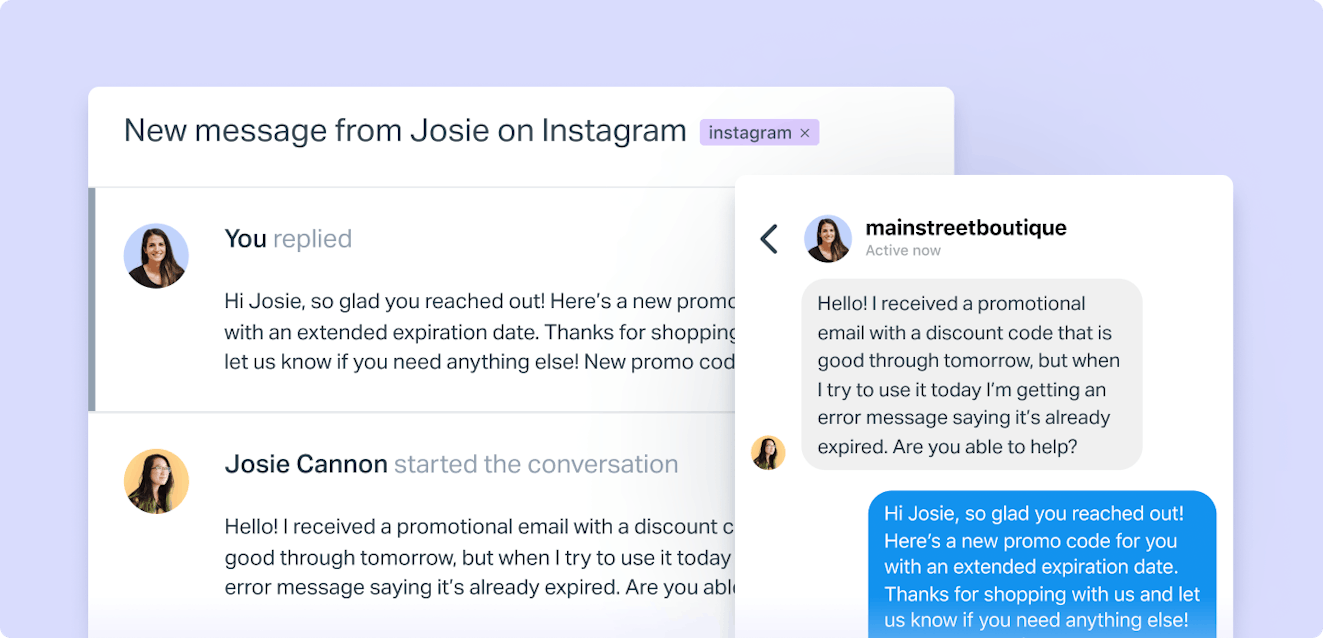
Look for help desk software that lets you see all your channels in one place, maintain conversation history across channels, and route messages to the right people based on customizable rules.
Make sure whatever tool you use actually integrates with all the channels you're using or planning to use. I've seen teams choose a platform that looked great but only connected to three of their five channels, which meant they still had to check two other platforms separately. That defeats the entire purpose.
One of the biggest headaches in multichannel support is jumping between platforms.
Help Scout's Inbox brings email, chat, and social channels together in one workspace, so your team can respond to everything without the context-switching chaos. You can see full conversation history, set up smart routing rules, and keep everyone on the same page — no matter which channel a customer uses.
5. Create channel-specific guidelines, and train your team
Each channel has its own norms and best practices, and your team needs to understand them.
Email support allows you to be thorough and detailed. You have space to explain things, include links, and write comprehensive answers. You can even share screenshots and video recordings (I highly encourage doing so).
Chat support needs to be faster and more conversational; nobody wants to wait five minutes between responses while you craft the perfect paragraph, and frankly, it’s more personable not to. Don’t be so casual it’s cringey, but do read the situation and change up your language to meet them where they’re at. If they’re throwing acronyms at you, it’s probably okay to reflect that back in your responses.
Social media support is often done in the comments of posts. It’s very public, which means every response is also marketing, and you need to be mindful of tone and brevity. DMs are a bit more private, but you should assume that any potential response is going to get pushed into a public space.
Don't assume your team will just figure this out. Create a simple one-page summary for each channel covering response times, tone, typical length, escalation criteria, and when to switch channels. Pin it where your team can find it and update as you learn.
Finally, train your team on these approaches. Let them practice, and give them examples of great responses for each channel.

6. Set up routing and assignments
There's no single right answer here: your team size, your channel mix, and your customers' needs all play a role, but you need some system for how issues are handled. Without clear routing, messages either get missed or doubled-up on.
Some teams assign specific agents to specific channels. Others use a round-robin approach. Some route conversations based on issue type, keywords, or customer priority.
Whatever system you choose, document it, and automate as much of it as possible through your support platform. The fewer steps agents have to remember to do, the more time they have for solving customer problems instead of managing workflows.
7. Start small and scale
When you launch a new channel, you don't have to go all in immediately.
Pilot it with limited hours. Test it with a specific customer segment. Gather feedback from your team about what's working and what isn't, then adjust before fully rolling it out.
This approach catches problems early, when they're still easy to fix. Maybe your routing rules need tweaking, your templates aren't quite right, or you need more trained agents. It's easier to adjust when you're handling 20 messages a day than 200.
Once the new channel runs smoothly and your team feels confident, scale it up. Once it’s working at scale, then you can consider adding additional support channels. The goal isn't to be on every channel tomorrow; the goal is to be genuinely helpful on the channels you choose.

Best practices for multichannel support
If you need a quick reference guide or want to share key takeaways with your team, here's a condensed checklist of what we covered above:
| What to do for multichannel support | What not to do for multichannel support |
|---|---|
✅ Start with one new channel at a time. Slow and steady wins the race. Master one channel before adding another. | ❌ Don’t add channels just because your competitors have them. Only add channels that your customers need and that you can support well. |
✅ Set specific response time expectations. “We’ll get back to you soon” is too ambiguous. “We’ll get back to you within one business day” sets a clear expectation. | ❌ Don’t promise 24/7 support that you can’t deliver. It’s better to have limited hours with excellent support than extended hours with burned-out agents and slow (or no) responses. |
✅ Be transparent about what your channels actually are. If it’s async, make it look async. | ❌ Don’t use the same canned responses across all channels. A 200-word response in email is great, but it reads like a robot in chat. |
✅ Keep your branding and tone consistent. (But also adapt to channel norms.) | ❌ Don’t go all in on day one. Start with a pilot, gather feedback, and scale gradually. |
✅ Connect all channels to a unified platform. Your team shouldn’t be checking five different places for customer messages. | |
✅ Create channel-specific guidelines. What works in email doesn’t work in chat. Give your team clear direction on tone, length, and format for each channel. |
How to know if it's actually working
You need to track whether your multichannel approach is actually helping customers and not just creating unnecessary work for your team.
Start with some proven customer service metrics:
First response time: Are you meeting the expectations you set? If you promised same-day responses on social media but you're averaging three days, something needs to change. Also, watch your original channels — if email was humming along at under 24 hours and suddenly it's taking three days because you added chat, that's a problem.
Resolution time: How long does it take to fully resolve an issue on each channel? This helps you understand if you've picked the right channels for the right types of problems.
Customer satisfaction by channel: Send CSAT surveys after interactions to see how customers feel about each channel. If chat has an 85% satisfaction rate but phone is at 40%, that's a clear signal.
Channel utilization. Are customers actually using the channels you've added? If you launched LinkedIn support six months ago and you're getting two messages a month, it might not be worth the effort.
Don't just measure everything and call it done. Pick three or four metrics that matter most to your team and customers, track them consistently, and actually use the data to make decisions. If a channel isn't working, it's okay to pause it, fix it, or even shut it down.
Make multichannel customer support work for your customers and your business
Multichannel support isn't about being everywhere at once — it's about being accessible in the ways that actually matter to your customers.
Start small, be intentional about what you add, and don't let the pursuit of more channels tank the quality of what you're already doing well.
If you take one thing away from this: Slow down. Add one channel, get good at it, then add another. Your customers will be happier, your team won't burn out, and you'll actually be able to deliver on the promises you make.
Anne-Marie Traas
Anne-Marie is a Fractional Head of Customer Success focused on providing an optimal customer experience in every interaction. She specializes in driving process and product improvements, creating thorough and easy-to-understand product documentation, and teaching others how to communicate more effectively through the written word. You can find her on her website.