Help Scout vs. Gorgias: A Deep-Dive Comparison


If you’re shopping for customer service software and comparing Help Scout vs. Gorgias, this comprehensive comparison of features, pricing, use cases, support, and scalability will make it easy to determine which tool is the best fit for your business.
Quick look: Who is Help Scout best for vs. who is Gorgias best for?
Help Scout is the better choice for small to mid-size businesses of any industry. It supports popular channels like email, live chat, and social via Facebook Messenger, Instagram, and WhatsApp, and it can also support voice and SMS via integrations. For ecommerce businesses, Help Scout integrates with popular ecommerce platforms such as Shopify, and it comes at a more predictable cost than Gorgias.
Gorgias is the better choice for ecommerce companies needing a deep integration with Shopify. Its pricing is usage-based and less predictable, but the extra Shopify functionality surrounding automation, sales, and revenue attribution are impressive. Gorgias is also better for companies that need broader channel support that includes native voice, SMS, or messages via TikTok Shop.
Learn more about Help Scout:
Help Scout vs. Gorgias: Pricing comparison
Most customer support software offers user-based pricing. With user-based pricing, subscribers pay a monthly (or annual) subscription fee based on how many users (agents, seats, etc.) their company will need during that time period.
Another popular way to price customer service software is through usage-based pricing. Usage-based pricing, also known as consumption-based pricing, means that you pay for the amount of product or service you use during a billing cycle.
Gorgias’ pricing plans are based on usage, whereas Help Scout takes a hybrid approach. Let’s dig in a bit deeper.
Help Scout pricing


Help Scout offers four pricing packages that start at:
Free: $0 per month for up to five users.
Standard: $25/user per month.
Plus: $45/user per month.
Pro: $75/user per month.
Help Scout’s paid plans allow you to provide support across email, live chat, Facebook Messenger, and Instagram, whereas its free plan is limited to email. WhatsApp support is included on both Plus and Pro plans. All plans include the ability to create a knowledge base for self-service.
All paid plans come with AI features at no additional cost — AI Assist is included in all paid plans and AI Summarize and AI Drafts are included with the Plus and Pro tiers.
Help Scout’s AI Answers is one of the only parts of the product that is billed according to usage. It can be added to any paid plan, and the price starts at $0.75/resolution. All accounts get a three-month free trial period before the per-resolution pricing kicks in.
Gorgias pricing


Gorgias has five help desk pricing packages:
Starter: Starts at $10 per month for 50 tickets/month.
Basic: Starts at $50 per month for 300 tickets/month.
Pro: Starts at $300 per month for 2,000 tickets/month.
Advanced: Starts at $750 per month for 5,000 tickets/month.
Enterprise: Pricing on demand; custom volume.
All of Gorgias’ plans come with an allotment of tickets and include support for email, live chat, Facebook, Instagram, TikTok, and WhatsApp. You can also create help centers for self-service.
If you go over your included ticket allotment, overages are charged based on your plan level:
Starter: $0.40 per ticket.
Basic: $40 per 100 tickets.
Pro: $36 per 100 tickets.
Advanced: $36 per 100 tickets.
Enterprise: $32 per 100 tickets.
AI, AI Agent, and automated interaction pricing
Though not widely advertised, a few of Gorgias’ AI features are included at no additional cost.* These include AI summaries, AI Library, AI translations, and AI-powered intent and sentiment analysis.
For everything else, you’ll need an AI Agent automated interaction package. The amount included in each package varies by plan level. For example, those on the Starter help desk tier have the option to add on 30, 40, or 50 interactions, while Basic plan users can add 30, 60, 100, 120, or 150 interactions.
When it comes to cost, each automated interaction costs $1.00 on monthly plans and $0.90 on annual plans. Any overages are billed at $1.50 per interaction.
*Not all of these features are mentioned on the pricing page, and some of them may still be in beta. Check Gorgias’ pricing page and help center for the most up-to-date information.
Voice and SMS pricing
Although most communication channels are included in the base plans, voice and SMS are not. Each channel requires a separate add-on, with voice tickets ranging from $0.40 to $1.20 per ticket and SMS tickets ranging from $0.41 to $0.80 per ticket depending on volume.
Understanding Gorgias’ usage fees
Taking in all of the separate fees discussed above can be a lot to remember, but it’s doable. The part where things get tricky is understanding how billing categories overlap. While it would make sense for each ticket to come from its specific allotment (help desk tickets, automated interactions, voice, or SMS), it’s not quite that simple.
The way Gorgias’ pricing system works is that you are charged a fee for every billable help desk, voice, or SMS ticket. A billable ticket is defined as any ticket where the customer receives at least one response from a human support agent or AI Agent or an automatic response triggered by a rule. Tickets where multiple messages are exchanged are still counted as just one billable ticket.
Then, if the ticket is resolved by an automation feature (AI Agent, Flows, Order Management, or Article Recommendations), you are charged an additional fee. This means that it’s possible to have multiple billable events for a single customer interaction.
Here’s an example:
You receive an email from a customer.
AI Agent responds to the customer and resolves the issue.
For this interaction, you would use up one help desk ticket and one of your automated interaction credits. In an instance where AI is not able to resolve the issue and needs to escalate to a human, you would only be charged for the help desk ticket.
There are all sorts of scenarios that could lead to different combinations of billable events — conversations where you use email and voice or SMS to resolve a single case, situations where customers don’t get back to you promptly and a new ticket is created with their reply, instances of merged tickets, etc.
In other words, Gorgias’ billing structure is complex. If predictability is a concern, it’s worth keeping an eye on your billing and usage page, especially in the beginning.
What customers say about Help Scout’s and Gorgias' pricing
Both Help Scout and Gorgias have 4.4 out of 5 stars on Capterra when it comes to value for money. However, customers often comment on Gorgias’ high cost, even when they otherwise like the platform:
“A little on the higher price point when it comes to the Automation add-ons.”* Read the full review.
“Gorgias is a great customer support software, but the only downside is its pricing structure, as it may seem pricey for startup brands with limited budgets.” Read the full review.
“Pricing can be a little high in comparison to some other platforms. It does seem like new updates are always an add-on.” Read the full review.
“It's priced too high compared to the rest of the market and its support is not helpful. We've been on another platform that actually treats us as a partner. Gorgias is likely just at the point in their lifecycle where they want to extract the most value from customers without providing any.” Read the full review.
*Quotes throughout this post have been lightly edited for clarity.
A note about Gorgias’ pricing
Gorgias’ pricing plans involve a lot of moving parts, and while we want to provide you as much information as possible, there are still other aspects of their pricing structure that we didn’t cover.
We recommend deep diving into their materials with your use case in mind to get a better idea of what Gorgias pricing might look like for you. To get you started, here are some of the resources we used to write this post:
Gorgias’ pricing page (including its FAQs)
Help Scout vs. Gorgias: Feature comparison
Help Scout and Gorgias each support the basic channels you would expect to find in a help desk like email, live chat, Facebook Messenger, Instagram DMs, and WhatsApp. Help Scout also offers voice and SMS via integrations, providing the flexibility to choose the provider that best suits your needs. Its integration with Aircall is particularly strong, allowing teams to make calls directly from within Help Scout.
Gorgias also offers broader social support, allowing you to respond to wall posts, comments, and recommendations in Facebook and mentions and comments in Instagram. Beyond the Meta-verse, Gorgias can integrate with TikTok Shop to provide message-based support.
When it comes to voice and SMS, Gorgias offers these channels natively via paid add-ons. Voice calls range from $0.40 to $1.20 per ticket, and SMS ranges from $0.41 to $0.80 per ticket, depending on volume.
| Channel | Help Scout | Gorgias |
|---|---|---|
✅ | ✅ | |
Live Chat | ✅ | ✅ |
Messenger | Messenger, wall posts, comments, recommendations | |
DMs | DMs, mentions, comments | |
TikTok | ❌ | TikTok Shop messages only |
Voice | w/integration | w/ voice add-on |
SMS | w/integration | w/ SMS add-on |
✅ | ✅ |
Ecommerce platform integrations


Help Scout and Gorgias integrate with major ecommerce platforms like Shopify, WooCommerce, and Magento (now Adobe Commerce). They are both Shopify Plus certified tools and their integrations allow you to view key customer and order details like order status, receipts, tracking information, and customer metrics directly in the sidebar of each conversation.
Beyond just viewing customer data, you can also take action on orders from within Help Scout and Gorgias. You can do things like edit, duplicate, cancel, and refund orders, as well as restock cancelled orders, all without having to switch tabs.
Gorgias’ Shopify integration also goes a step further with features like:
Customer variables that allow your team to easily personalize macros.
The ability to create discount codes.
Dynamic product recommendations.
AI-powered automation for things like order tracking and refunds.
These features can be helpful for teams that blend support and sales, but for most support-focused teams, Help Scout provides the right level of detail and functionality.
Conversation management features

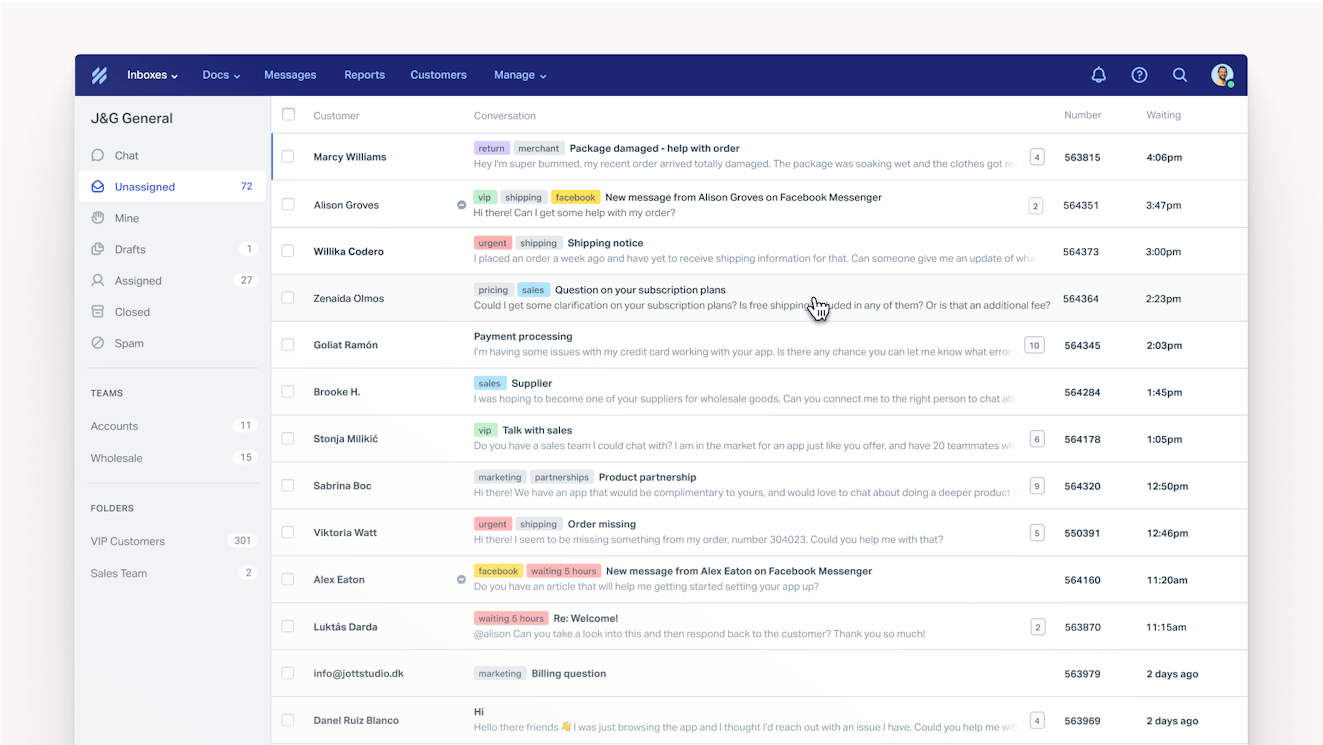
Help Scout and Gorgias offer similar conversation management features. Both include a shared inbox that helps your team manage incoming requests from a centralized location and are packed with features that make responding to customers easier and more efficient.
Here are some of the most notable:
Manual ticket assignments: Create ownership and clear expectations by assigning tickets to specific agents or teams.
Automatic routing: Automate the ticket assignment process to simplify triage.
Macros/saved replies: Create and save templated responses to common requests.
Snooze: Temporarily remove customer conversations from your queue. This can be helpful when you’re waiting for more information or want to prioritize other tasks.
Tags and custom ticket fields: Organize conversations by tagging or filling in custom fields based on product, issue, or other criteria.
Views: Create private or shared views that display a specific subset of conversations based on criteria like assignee, ticket status, tags, and time-based events.
Workflows/rules: Automate repetitive tasks using simple if/then logic.
Customer profiles: Get context like customer or order information, or view past conversations within the conversation window.
Keyboard shortcuts: Work through the queue faster with simple keyboard shortcuts.
While both platforms generally have feature parity when it comes to ticket management, there are a few differences. For instance, Help Scout also offers a send later feature that allows you to schedule replies in advance. Gorgias doesn’t have send later, but it does natively support SLAs, which aren’t currently available in Help Scout.
There are also some differences in how the two platforms handle automatic ticket routing. All ticket routing in Gorgias is rule based. To automatically distribute a group of tickets, you create a rule to target a segment of tickets, select the team you want to assign to, enable auto-assignments, and set capacity limits. Then, tickets are automatically spread across the team based on priority, creation date, and agent eligibility.
Help Scout supports rule-based routing via workflows, but it also offers round-robin and load balanced routing as a dedicated feature. With round-robin, conversations are assigned one by one to each agent in alphabetical order; with the load balanced approach, conversations are assigned to the team member with the fewest active conversations. Both types focus on the inbox as a whole and are not rule-based.
This is a good reminder that implementation across different software can vary. If there are any “must-have” features for your team, be sure to look into how each platform accomplishes the associated tasks.
Collaboration features
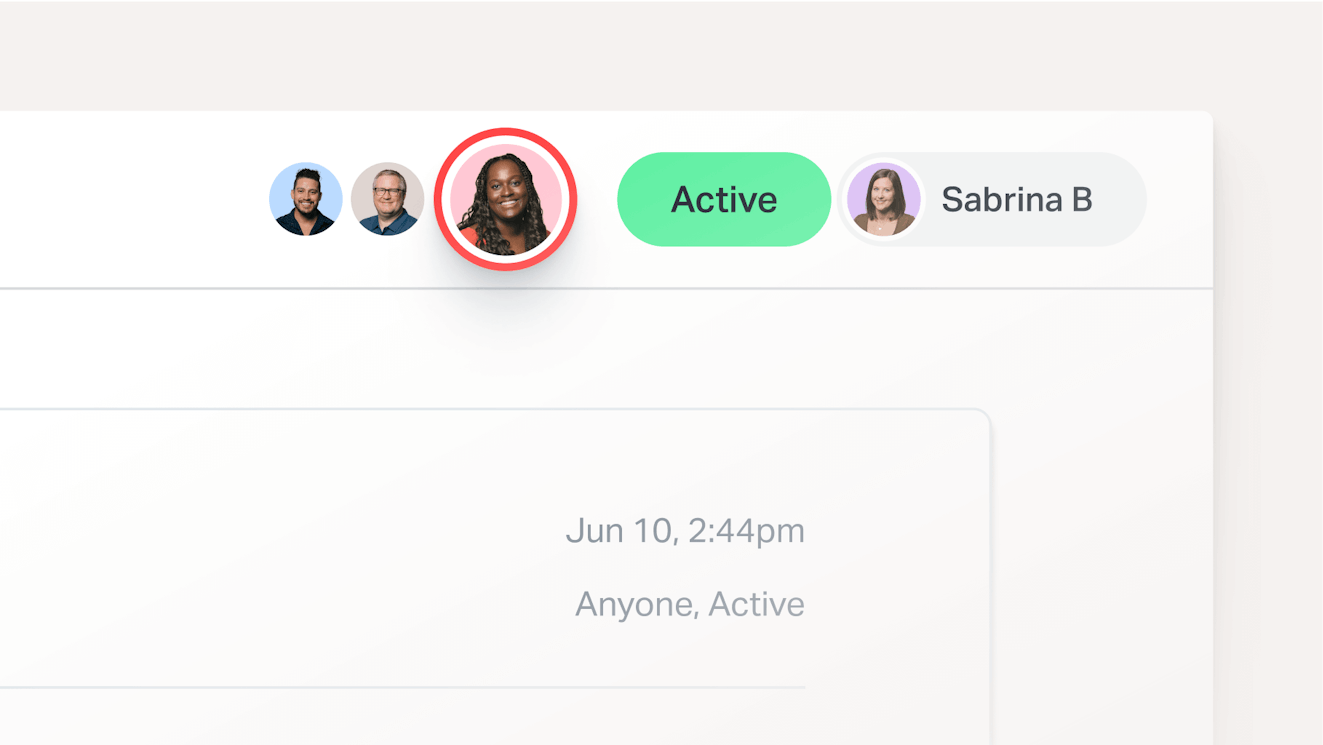
Help Scout and Gorgias each have strong collaboration features that allow teams to work together and stay aligned while meeting customer needs. Some of the features the tools offer include:
Collision detection: Visual indicators in the queue and on individual tickets that indicate whether another agent is viewing or replying to a conversation. This helps you avoid duplicated work or accidentally confusing customers with conflicting information.
Internal notes: Communicate with other team members by leaving notes within the conversation that are only visible to your team. Internal notes are great for providing context when escalating a case or asking others for help.
@mentions: Speaking of asking someone for help, both platforms allow you to “mention,” or tag, other teammates in an internal note. This keeps all of the information about an issue within the conversation thread, creating a single source of truth.
Teams: Create teams to define groups of employees who work together on conversations.
Roles and permissions: Determine and assign the right level of access for users in your account. This allows everyone to collaborate and work together while maintaining a level of safety and security.
One advantage for Gorgias’ usage-based pricing model is that you can have up to 500 users on most of their plans. While Help Scout’s user-based pricing may not allow you to bring all of your company into the software, its Light Users feature can help.
Light users are user seats that come with limited access, which can be great for those who need to review information in Help Scout or collaborate with team members but not actually respond to customers. Plus plans come with five light user seats and Pro plans come with 15. Additional seats can be purchased separately.
For those that like the concept of a limited access user, it’s important to note that Gorgias has this type of role as well. It’s called an observer, and any of your included 500 users can be set as one.
Knowledge base and self-service features


Help Scout and Gorgias allow you to create public and private knowledge bases. A public knowledge base is perfect for helping customers find answers to common questions on their own. A private knowledge base can be helpful for storing internal information for your team.
Each tool allows you to customize the appearance of your help centers, includes search functionality, and allows you to use a customized domain. It’s also possible to offer your customers easy access to the content in multiple locations, but each tool does this differently.
With Gorgias, you can embed your help center into your company website or, if you’re a Shopify user, any page of your shop. You can also easily add it to your shop’s navigation bar or link to it in your order confirmation emails. While embedding the help center on your site will require some coding knowledge, any Shopify embeds can be set up without code.
Help Scout lets you share your content in a few different ways. While it’s possible to directly embed a Docs site, most people display help articles through a Beacon. Beacon is Help Scout’s web widget, and you can easily add one to any web page or app. Customers can browse your entire help center within a Beacon, or you can display content in a sidebar, modal, or pop up.
Another helpful feature for Gorgias users who integrate their accounts with Shopify is the ability to add order management buttons to the top of your help center, turning it into an order management portal where customers can track, return, cancel, or report an issue with their order.
Cost-wise, Help Scout includes at least one help center across all of its plans. You get one with the free plan, two with Standard, three with Plus, and five with Pro. You can also add additional help centers to any paid plan for an additional $20 per month.
All of Gorgias’ plans include up to 10 help centers, except for the Enterprise plan, which has no limit. Adding order management controls to a help center requires an AI Agents subscription, and associated usage fees apply.
AI features


Help Scout has four main AI features designed to speed up customer replies and lighten your support team’s workload.
AI Summarize: Summarize long conversation threads, enabling your team to more quickly get up to speed on issues during escalations, case handoffs, or QA sessions.
AI Assist: Use AI to improve your customer replies and knowledge base drafts. AI Assist can check for spelling and grammar errors and improve copy by altering tone or length. It can also be a multilingual support aid by translating your text into other languages.
AI Drafts: With one click, Help Scout can automatically draft a reply to an incoming email, basing its response on historical conversations and information in your knowledge base. All you have to do is review, edit (if necessary), and hit send.
AI Answers: Provide instant answers to your customers with AI Answers, a chatbot powered by generative AI. It forms its answers using your knowledge base content as well as other sources like your company’s website.
AI Answers can be added on to any paid plan. Access to AI Summarize, Assist, and Drafts is dependent on your plan tier.
The Gorgias counterpart to AI Answers is AI Agent, which is a chatbot designed to help teams work smarter in both sales and support contexts. When it comes to support, AI Agent is good at triage. It’s able to understand a customer’s question, determine if it has the information it needs to resolve the issue, analyze customer sentiment and urgency, and either handle or escalate the case accordingly.
AI Agent is capable of taking real action on tickets, especially in cases where you have integrated your Shopify store with Gorgias. It has customer context and can help track, exchange, or refund orders keeping simple tasks out of your queue.
Sales-wise, AI Agent is designed to act like a shopping assistant, providing product recommendations, encouraging upsells, and providing discounts when beneficial.
While the chatbot is powered by generative AI, you can build Flows for all of the scenarios above. This allows you to plan out the paths you would like the bot to take, giving you more structure and control over customer interactions.
Gorgias also has several other helpful automation features. Like Help Scout, it has an AI Summaries feature and AI-powered translations. Plus, the platform has intent and sentiment detection, AI-powered ticket tagging, and a knowledge base-specific feature called AI Library. AI Library periodically suggests and drafts new help center articles, reducing the burden of knowledge management.
Proactive support features
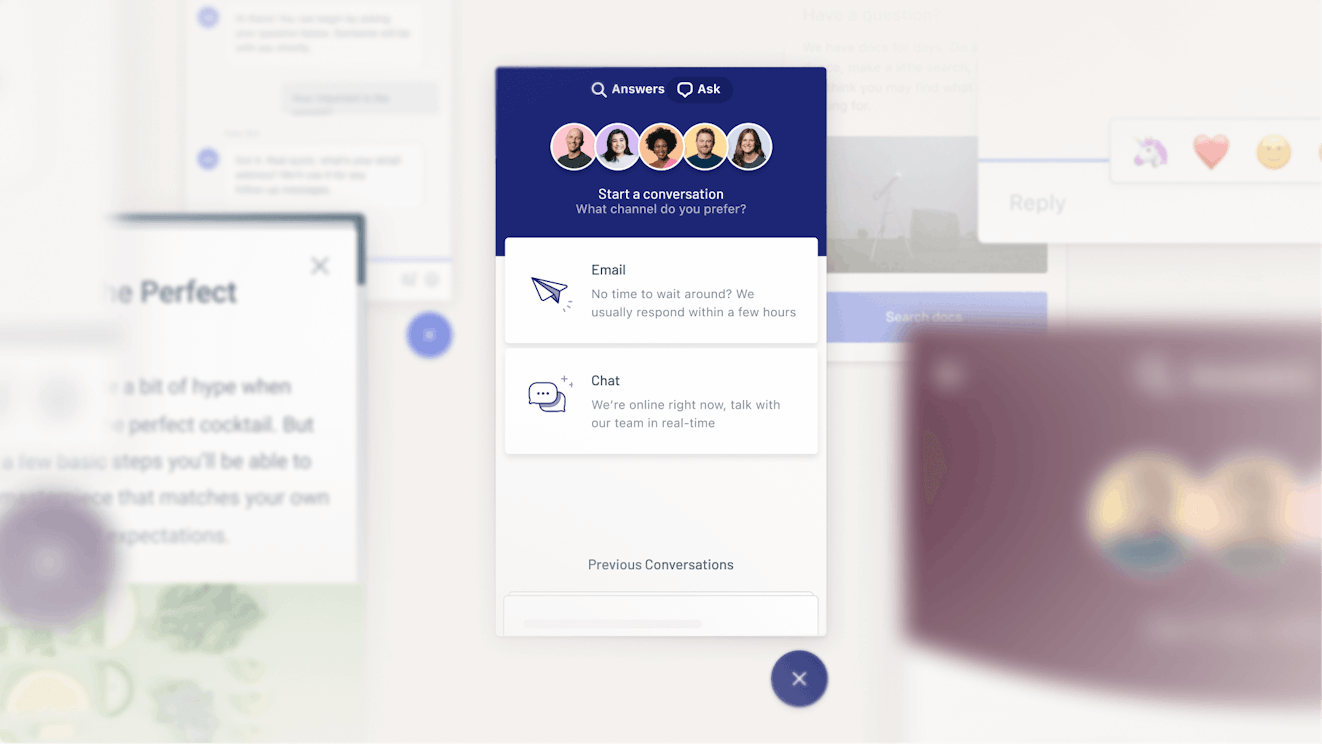
Help Scout’s proactive support feature is called Messages. It allows you to use a Beacon on your site to provide helpful information at key moments in your customer’s journey based on triggers like time on page and scroll behavior.
For instance, you might surface a help center article for customers who linger on a page or launch a chat window in cases where customers may be stuck. You can also gather voice of the customer information through NPS or simplified surveys that simply require a thumbs up or down.
Messages can also be used for other things like announcing sales, informing customers of downtime, or promoting new products through pop-ups, modals, or banner messages.
Every paid Help Scout plan includes 2,000 messages. It’s also possible to purchase additional contacts if you need them.
Gorgias offers similar capabilities, though the setup and access models differ. You can use the Flows feature to build out similar proactive interactions to those described above. In addition, every account is given three light campaigns per chat integration, which will allow you to proactively display simple chat messages based on URLs or UTMs.
For more complex campaigns based on Shopify data or user behavior, you need to purchase the Convert add-on.
Reporting and analytics features
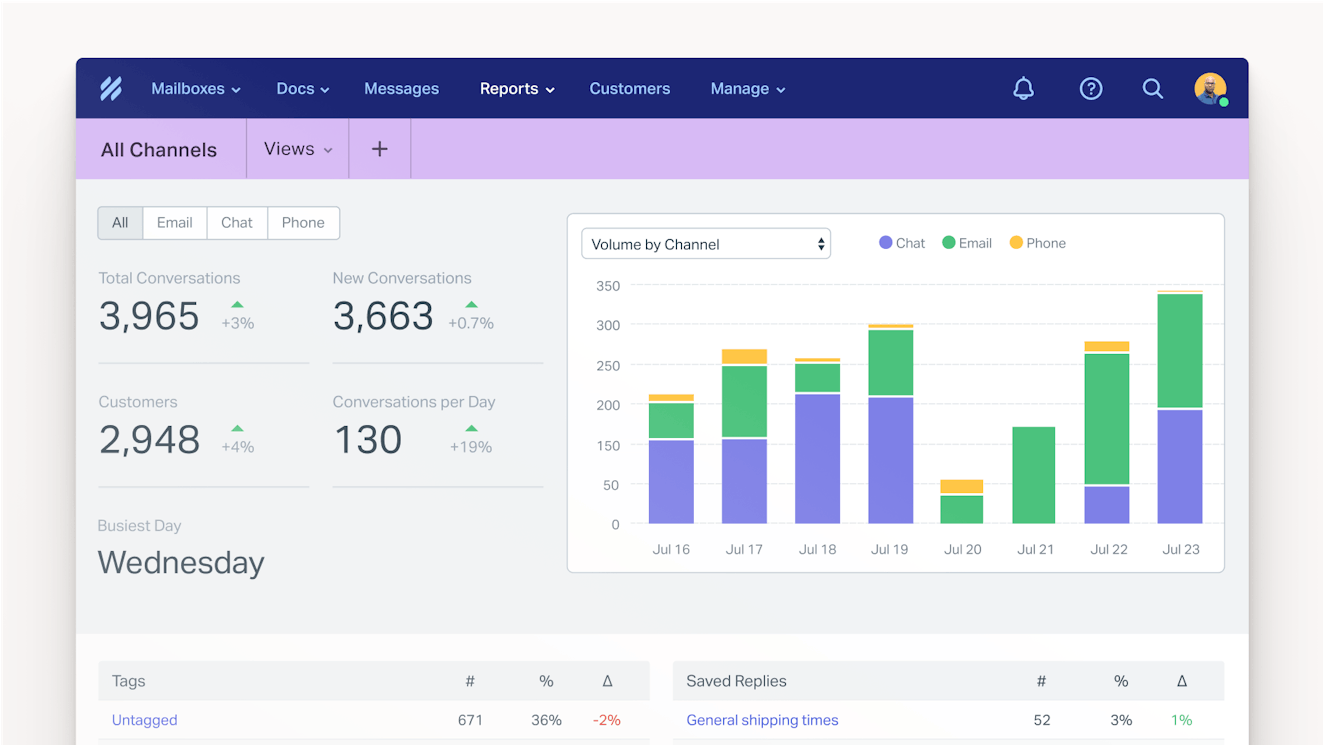
You’ll find reporting dashboards in both Help Scout and Gorgias that will enable your team to keep an eye on things like ticket volume, response time, agent performance, and help center usage. Both tools let you set office hours so your reports only reflect the time your team is at work. There are also customer satisfaction (CSAT) surveys with associated reports.
Aside from these basic reports, Help Scout also provides reporting for its Beacon tool, which gives insight into proactive support performance. You’re able to see Messages and AI Answers stats and easily follow up with customers if necessary. Gorgias has a similar report for tracking Flows, Order Management, Article Recommendations, and AI Agent data.
Gorgias also offers some advanced reporting options that aren’t available in Help Scout. There is an SLA report, trend tracking, and a ChatGPT connector for natural language data queries. Gorgias also offers live statistics which lets you view key metrics in real time.
One of Gorgias’ most unique offerings is its revenue report. It analyzes support conversations and sales to show how much revenue your support team generates. However, as with many of Gorgias’ best ecommerce features, it’s only available for customers with Shopify shops.
Ease of use and setup


Both tools get high scores (9.2/10) on Capterra when it comes to ease of use, with Help Scout ranking slightly higher (9.2/10) than Gorgias (8.8/10) in terms of its ease of setup.
In G2 reviews, customers report loving Help Scout’s smooth UI/UX, which is well organized and keeps distractions to a minimum. They also note that the system can be implemented quickly and set up in just five minutes.
“It is straightforward to get up and running. As part of a small business, we needed something that could be implemented quickly, our support team could learn easily, and most of all reach our customers seamlessly. Help Scout accomplished all three.” Read the full review.
Gorgias customers also remarked on its ease of use and how quickly it lets teams onboard new agents and get them up to speed.
Customer support


Help Scout and Gorgias each get high ratings for quality of support on Capterra, coming in at 9.1/10 and 9.2/10 respectively.
Help Scout offers many resources to customers including 24/6 support, live classes, a full help center, and additional content designed to help them get the most out of the platform. Here’s what some customers had to say:
“Technical support is #1. Their team is constantly updating features and notifying their customers with new information and products in a way that isn't salesy or pushy, but purely informative.” Read the full review.
“The customer support is over-the-top, amazing, above-and-beyond helpful. These are not clichés, they should be taken literally. …we had to drop the Help Scout service — and even though we were dropping them, they gave us tremendous help in ways that they were totally not obliged to do. So that is a real measure, don't you think? Going out of your way to help a customer that is leaving. And this has been consistent with their approach through the many years we've used them.” Read the full review.
Gorgias also has many great customer resources. They have the standard help center, but they also provide training modules via Gorgias Academy, blog content, and more. Customers also report finding value in their community group:
“The support is always helpful and quick to respond, they also have a very active community where you can ask questions and members are very active.” Read the full review.
Scalability
Both Help Scout and Gorgias are capable of helping businesses scale. Which one you choose will likely come down to your budget and specific use case.
Help Scout is ideal for teams managing a large amount of conversations because its base cost doesn’t fluctuate with volume. Gorgias’ usage-based pricing can be quite unpredictable and even a little confusing. While it’s true that Help Scout’s AI Answers pricing is also usage based, it’s a flat, per-resolution rate that is a full $0.15 cheaper than the cheapest rate for Gorgias’ AI Agents.
Gorgias is great for ecommerce businesses, especially ones that rely on Shopify. Though Help Scout’s Shopify integration can take care of most of what ecommerce support teams need to handle, Gorgias’ integration is deeper and, as your ecommerce business grows, you may need more of those features.
However, if you aren’t a Shopify customer or an ecommerce business, then you won’t be able to use a lot of the features that really makes Gorgias stand out, such as their revenue report. Help Scout’s integration has plenty of Shopify capabilities for most ecommerce businesses, plus it’s also a great option for companies in other industries.
Help Scout vs. Gorgias: Which tool is right for you?
If all of the information above didn't make it clear which platform is the best for your team, here's a final summary to help you choose the right option:
Choose Help Scout if you’re a small to mid-sized business looking for an easy-to-use, quick-to-implement customer support tool to manage email, live chat, Facebook Messenger, Instagram DMs, and WhatsApp. Help Scout is also the best choice if you use Aircall to manage voice and SMS channels.
Choose Gorgias if you need broad channel support including voice, SMS, TikTok Shop, or deeper social integrations that can also manage wall and post comments.
Choose Help Scout if your support team regularly relies on performing Shopify actions like refunds, exchanges, and order tracking within your support tool.
Choose Gorgias if you run your ecommerce business through Shopify and you not only need the features above but also need features that can use Shopify information to automate tasks, make it easier for your support team to provide sales support, and measure your team’s revenue impact.
Choose Help Scout if you prefer predictable, easy-to-understand pricing that isn’t tied to conversation volume and an AI chatbot that has a cost per resolution that is $0.15 less than Gorgias’.
Both Help Scout and Gorgias are leaders in the customer support space, and you really can’t go wrong with either choice. Consider the differences between the two platforms, select the platform that feels like it will best support your business’s unique needs, and then start a trial to make sure that it works for you both in theory and in practice.
Alexa Ahrens
Alexa is a content strategist at Help Scout, where she writes and helps other authors tell stories about customer experience, technology, and company culture. Before working in support and content creation, she worked at a wax museum — an experience that prepared her surprisingly well for a life of storytelling. Connect with her on LinkedIn.