Help Scout vs. HubSpot Service Hub: Deep-Dive Comparison


If you’re shopping for customer service software and comparing Help Scout vs. HubSpot Service Hub, this comprehensive comparison of features, pricing, use cases, support, and scalability will help you determine which tool is the best fit for your business.
Quick look: Who is Help Scout best for vs. who is HubSpot Service Hub best for?
Help Scout is the better option for growing teams, while HubSpot Service Hub is the better option for small teams that plan to stay small.
HubSpot Service Hub's Starter plan ($15/seat per month) is a lower-cost option than Help Scout's Standard plan, but HubSpot's next-tier plan jumps to six times the per-user cost ($90/seat per month). This makes it cost-prohibitive if you'll ever need more advanced features (or even something as basic as a knowledge base) as your team scales.
Note: At the time of writing this post, HubSpot was offering a 40% discount on its Starter plan, making the plan $9/seat per month when paying annually. However, since it's labeled as a temporary promotion (though no end date is noted), we opted to use the undiscounted price throughout this post.
While Help Scout's Standard plan costs more ($25/user per month) than Service Hub's Starter plan, it includes more features, and the price increases for moving to higher-tier plans are much less dramatic. In fact, Help Scout's most expensive plan is $15/user per month less than HubSpot's Professional plan.
Learn more about Help Scout:
Help Scout's free plan vs. HubSpot Service Hub's free plan
If you're a small business or startup looking for a free platform to help you better organize and manage your requests from customers, both Help Scout's and HubSpot Service Hub's free plans are great options to consider.
Help Scout's higher user limit (five users on Help Scout versus two seats on Service Hub) makes it a good choice for larger teams. Help Scout also gives you access to features you won't find in Service Hub's free plan, such as tags, email snoozing, and a knowledge base builder.
However, HubSpot does offer a couple of channels you won't find in Help Scout’s free plan, namely live chat and Facebook Messenger. This makes it a better choice for very small teams who are more focused on delivering real-time support.
The table below shows what's included in Help Scout's and HubSpot Service Hub's free plans.
| Feature | Help Scout | HubSpot Service Hub |
|---|---|---|
Number of users/seats | 5 | 2 |
Shared inbox | ✅ | ✅ |
Knowledge base | ✅ | ❌ |
Live chat | ❌ | ✅ |
Facebook Messenger integration | ❌ | ✅ |
Reporting | ✅ | ✅ |
Tags | Up to 10 | ❌ |
Saved replies | Up to 10 | Up to 3 |
It's also worth noting that the support you'll get access to as a free plan customer differs between Help Scout and HubSpot.
As a Help Scout free plan customer, you can reach out to our support team for one-on-one help, take one of our live classes, and access all of our self-service resources. HubSpot Service Hub's free plan customers only get access to community, self-service, and AI support.
For the remainder of this post, we'll be comparing Help Scout's and Service Hub's paid plans.
Help Scout vs. HubSpot Service Hub: Feature comparison


Both Help Scout and HubSpot Service Hub let you deliver support on the major channels: email, live chat, self-service, and social.
For phone and SMS support, Help Scout offers integrations with providers like Aircall, Talkdesk, Textline, and Text Request. Service Hub offers phone support natively, and while it's possible to use the platform to deliver SMS support without an integration, you'll need a Marketing Hub Professional subscription or higher and will need to purchase the Marketing SMS Add-On.
Channel pricing comparison
| Channel | Help Scout's starting price | HubSpot's starting price |
|---|---|---|
Included in the Standard plan at $25/user per month | Included in the Starter plan at $15/seat per month | |
Live chat | Included in the Standard plan at $25/user per month | Included in the Starter plan at $15/seat per month |
Knowledge base | Included in the Standard plan at $25/user per month | Included in the Professional plan at $90/seat per month |
Facebook Messenger | Included in the Standard plan at $25/user per month | Included in the Starter plan at $15/seat per month |
Included in the Standard plan at $25/user per month | Only available through a separate subscription to HubSpot Marketing Hub(Professional plan or higher) | |
Included in the Plus plan at $45/user per month | Included in the Professional plan at $90/seat per month | |
Phone | Via integration only | Included in the Starter plan at $15/seat per month |
SMS | Via integration only | Only available through a separate subscription to HubSpot Marketing Hub (Professional plan for higher) and with the purchase of the Marketing SMS Add-On |
Conversation management features


Both Help Scout’s and HubSpot Service Hub’s shared inboxes centralize all support requests from all channels, giving your team a single place to see and manage all customer inquiries.
Both tools also offer features that make it easier to route, manage, and respond to requests:
Ticket assignments that let you assign specific tickets to specific agents.
Customer profiles that show key information about the person requesting support.
Internal notes that let you collaborate on replies privately.
Round-robin and load-based routing that automatically assign incoming requests equally.
Saved replies that let you create canned responses to frequently asked questions.
Auto-replies that let customers know their requests have been received.
Tags that let you label and report on specific types of requests.
Views that group together conversations that meet specific criteria (tags, assignees, etc.).
Workflows that automatically route, sort, and perform actions on requests.
It's worth noting that while some of the features above are available in Service Hub, they're much more complicated to set up and use than in Help Scout. For example, you need super admin permissions to create tags in HubSpot, and the help doc describing how to use them is so focused on the CRM use case that it's difficult to determine how they can actually be used in support.
Tags in Help Scout, on the other hand, can be created by anyone on your team in less than a second. If you do need to restrict access for specific users, you can, but it’s not the default.
Service Hub does offer one feature you won't find in Help Scout: skill-based routing. It lets you auto-assign requests to specific users based on custom skills you create in the system.
The table below shows the lowest-cost plan you'll need to be on to get access to each platform's different conversation management features.
| Feature | Help Scout | HubSpot Service Hub |
|---|---|---|
Manual ticket assignments | Included in the Standard plan at $25/user per month | Included in the Professional plan at $90/seat per month |
Round-robin ticket assignments | Included in the Plus plan at $45/user per month | Included in the Professional plan at $90/seat per month |
Load-based ticket assignments | Included in the Pro plan at $75/user per month | Included in the Professional plan at $90/seat per month |
Skill-based ticket assignments | Not available | Included in the Enterprise plan at $150/seat per month |
Internal notes | Included in the Standard plan at $25/user per month | Included in the Starter plan at $15/seat per month |
Customer profiles | Included in the Standard plan at $25/user per month | Included in the Starter plan at $15/seat per month |
Collision detection | Included in the Standard plan at $25/user per month | Included in the Professional plan at $90/seat per month |
Saved replies | Included in the Standard plan at $25/user per month | Included in the Starter plan at $15/seat per month |
Tags | Unlimited tags included in the Standard plan at $25/user per month | Up to 20 tags included in the Starter plan at $15/seat per month |
Inbox views | Included in the Standard plan at $25/user per month | Included in the Professional plan at $90/seat per month |
Workflows | Included in the Standard plan at $25/user per month | Included in the Professional plan at $90/seat per month |
Knowledge base and self-service features


Both Help Scout and HubSpot Service Hub let you create customer-facing knowledge bases. On both platforms, you can customize the design of your help center, sort articles into categories, see revision histories, publish multi-language articles, optimize your articles for search engines, and access reports showing how your help center is performing.
Help Scout's knowledge base builder (Docs) is significantly less expensive than Service Hub's. You can create two Docs sites on the Standard plan ($25/user per month), three on the Plus plan ($45/user per month), and five on the Pro plan ($75/user per month). Additional Docs sites can also be added to any plan for $20/site per month.
HubSpot only includes its knowledge base builder on its Professional and Enterprise plans. You can create one knowledge base on the Professional plan ($90/seat per month) and up to 25 on the Enterprise plan ($150/seat per month).
Help Scout is also the better choice if you need to create both internal and external knowledge bases. While you can technically create an internal knowledge base on HubSpot by setting all of the articles to private, you have to do this for every single article you publish. In Help Scout, you can set entire collections to private, or you can make the entire site private with restricted docs.
However, HubSpot is the better choice if you need to create customer portals; Help Scout does not have a customer portal feature. Service Hub's customer portal feature aggregates all of the tickets for a specific customer into a private hub and can also display knowledge base articles you created specifically for those customers.
Reporting and analytics features


Both Help Scout and HubSpot Service Hub offer pre-built and custom reports — and report exporting — so you can easily track your KPIs and monitor volume trends overall and by channel. Both also offer office hours, which is a way to define the times when you offer support so your reports aren't negatively impacted by days/times when no one is working.
The key difference between Help Scout and HubSpot is HubSpot's custom dashboards capability. While Help Scout offers pre-built dashboards and the ability to create custom reports, Service Hub gives you the ability to add custom reports you've created to custom dashboards that serve as a one-stop shop for viewing all of the reports you care about the most.
AI features
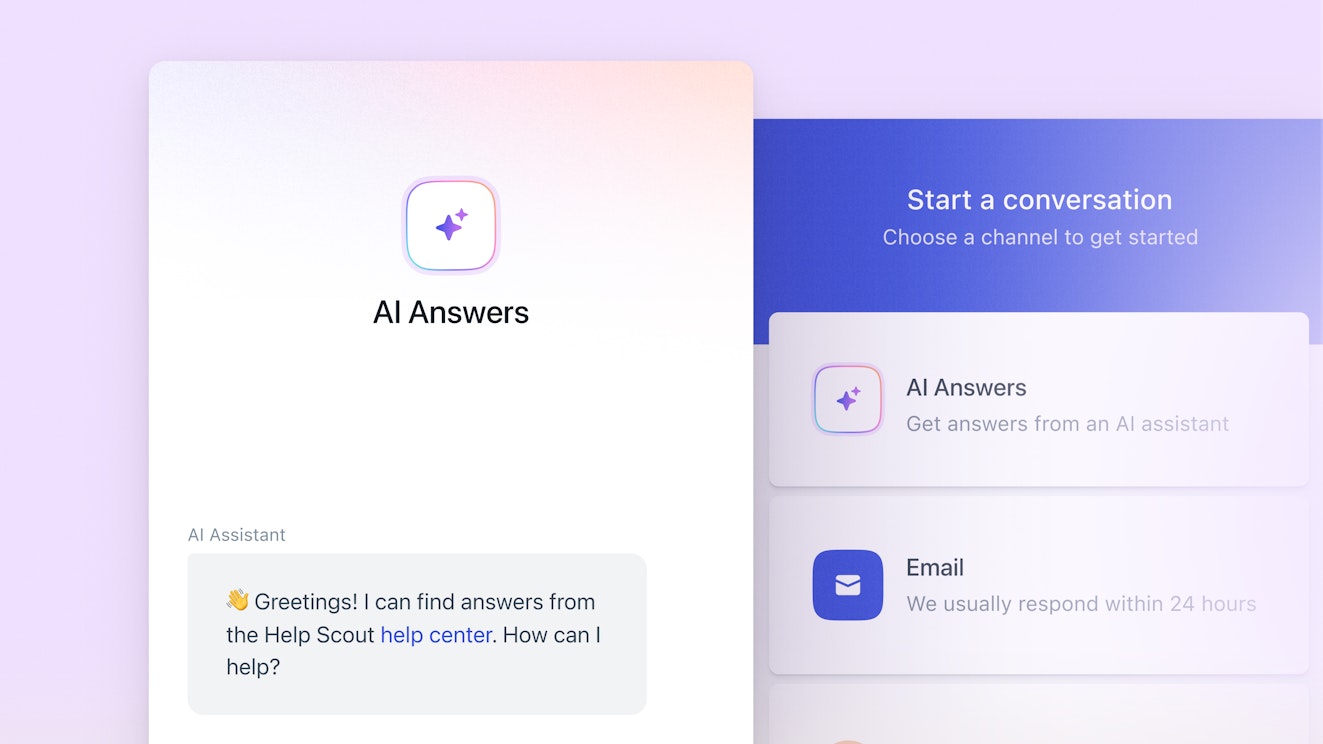
Help Scout and HubSpot Service Hub both have a number of AI features.
Both tools let you answer customers' questions automatically via generative AI. Help Scout's AI Answers uses knowledge from your help center and website and works through its live chat widget. HubSpot's Breeze Customer Agent uses data from your knowledge base articles, HubSpot CRM, and any files you upload, and it can be used to reply to requests from any channel.
Both tools also have AI copilot features that help your team work faster. However, Help Scout's copilot features are more focused on the support use case, while Service Hub's are more focused on their marketing and sales use cases.
In Help Scout, you can use AI to:
Automatically draft replies to email requests using knowledge from your help center, website, and previous support conversations.
Turn long conversation threads into summaries to get up to speed on conversations quickly.
Adjust the tone, spelling, or length of an email reply or knowledge base article you've written or translate a reply/knowledge base article into a different language.
HubSpot's Breeze Assistant is a chatbot that uses the information in your HubSpot platform to answer employees' questions through a chat interface. However, it does have a couple of applications that are specifically for customer support teams:
Use it to generate new content for a knowledge base article, to change the voice or tone of an existing article or to rewrite, expand, or summarize content in a help doc.
Use it to create a summary of responses to a feedback survey.
Service Hub also has a knowledge base agent that monitors your help center and customer support conversations to identify gaps in your knowledge base content. It pulls those gaps into a report, finds conversations where your team provided the missing information in replies to customers, and then — at your request — automatically turns those replies into help articles.
Help Scout vs. HubSpot Service Hub: Pricing comparison
Both Help Scout and HubSpot Service Hub use hybrid pricing models. The base software for both products is user-based, meaning your per-month price will increase as you add new users to your account. However, pricing for their AI chatbots is usage-based, meaning you'll pay more based on the number of requests that your AI agents resolve.


Help Scout has four pricing packages:
Free: $0 per month for up to five users.
Standard: $25/user per month.
Plus: $45/user per month.
Pro: $75/user per month.
As far as usage-based pricing, AI Answers starts at $0.75/resolution after a three-month free trial. AI Assist is included in all paid plans at no additional cost, and AI Summarize and AI Drafts are included in Plus and Pro at no additional cost.

HubSpot Service Hub has four pricing packages:
Free: $0 per month for up to two seats.
Starter: $15/seat per month.
Professional: $90/seat per month.
Enterprise: $150/seat per month.
HubSpot's Breeze Assistant is included in all plans at no additional cost. The Breeze Knowledge Base Agent is included in the Professional and Enterprise plans if you also have an active Breeze Customer Agent subscription.
As far as usage-based pricing, Service Hub's Breeze Customer Agent (available only on the Professional and Enterprise plans) works on a credit-based system. You get 3,000 credits each month on the Professional Plan and 5,000/month on the Enterprise plan.
Each conversation you handle uses 100 credits, so you get between 30 and 50 handled conversations each month for your base plan cost. If you need to handle more conversations than what's included in your plan, you can buy additional credits for $10 per 1,000 credits, making the usage-based price $1/conversation.
Overall, Help Scout is much more affordable than HubSpot Service Hub, particularly for growing companies. While HubSpot Service Hub's Starter plan has a lower cost than Help Scout's Standard plan, it offers far fewer features, and the cost of upgrading to get the features you're missing will cost you $15/user per month more than Help Scout's most expensive plan.
As one HubSpot customer writes: "We are on the Pro plan for most HubSpot features. We received a 90% discount the first year, a 50% discount the second year, and we will be paying full price next year. Those discounts have been a big help, but our HubSpot expenses are growing much faster than revenue. At this 50% discounted rate, HubSpot is more than twice the expense of our entire technology stack (over 100 services) on Azure."
* Customer quotes featured in this post have been lightly edited for clarity.
Ease of use and setup


When comparing Help Scout and Service Hub on ease of use and setup, Help Scout is the clear winner. Help Scout has higher ratings than HubSpot Service Hub on G2 for ease of use, ease of setup, and ease of admin.
As one Help Scout customer writes: “What I like most about Help Scout is the ease of use. Help Scout is easy to set up and, in most cases, you can avoid working with your IT team. Help Scout also has a very intuitive interface, which makes training your team easy! The Help Scout team got it right!”
It is worth keeping in mind that HubSpot's tools all use the same interface, which can make it fairly intuitive for teams that already have experience using HubSpot's Marketing Hub or CRM.
Integrations


Help Scout offers more than 100 integrations with the tools that support teams most often need to connect to their help desks, including phone and SMS support software, CRMs like Salesforce and HubSpot, social media platforms like Facebook and Instagram, and ecommerce platforms like Shopify.
The overall HubSpot platform offers more than 2,000 integrations, though many of those integrations are more sales- or marketing-focused. If you filter the list by "essential apps for customer service," there are only 20 integrations listed.
Of course, if you're using HubSpot's marketing or sales platforms, one big advantage is the native integration between those systems and Service Hub, though Help Scout does have a HubSpot integration you can use to connect data between it and HubSpot.
Scalability
Both Help Scout and HubSpot Service Hub have the basic features that teams need while they’re small and the more advanced features they’ll need as they grow, so scaling the size of your team on either platform is seamless. However, Help Scout is the much more affordable option when scaling.
While HubSpot's base plan is affordable at $15/seat per month, it doesn't include fairly baseline features like a knowledge base builder, ticket assignments, collision detection, inbox views, and automated workflows. To add those features, you'll have to jump up to the next-tier plan, which is six times the cost at $90/seat per month.
All of Help Scout's plans include all of those features — even the $25/user per month Standard plan — and the cost of its plans scale more reasonably ($25 → $45 → $75 per user). Help Scout's highest-cost plan costs less than HubSpot's Professional plan ($90/seat per month) and half as much as HubSpot's Enterprise plan ($150/seat per month).
Customer support


Both Help Scout and HubSpot are highly rated for their customer support, while Help Scout has a slightly higher rating (9.1/10) on G2 than Service Hub (8.8/10) for quality of support. Both tools offer email and live chat support to customers on all paid plans, and both have detailed help centers, so you'll get great help when you need it regardless of which platform you choose.
Help Scout vs. HubSpot Service Hub: Which tool is right for you?
If all of the information above didn't make it clear which platform is the best for your team, here's a final summary to help you choose the right option:
Help Scout is custom-built for support teams. It offers more must-have features in its lower-cost plans, its documentation is all about how to use its different features for customer support (not some support, some sales, and some marketing), and its integrations are focused on the tools support teams need to connect to their help desks.
HubSpot's Starter plan is an affordable option for teams with very basic support needs. If you don't have a dedicated support team yet and are already using HubSpot's CRM or marketing platforms, it can be a cost-effective option — and also intuitive to use since you're already familiar with HubSpot's interface.
Help Scout is the more affordable option for growing teams. Its highest-cost plan is half the per-user cost of HubSpot's highest-cost plan, and you won't run into issues where your per-user price more than quadruples because you need a basic feature like a knowledge base or automated workflow.
With tools for marketing automation, customer relationship management, customer support, content management, data management, and payment processing, HubSpot is the better choice for businesses that would rather have a single, central platform for multiple business functions than several different tools specialized in individual functions.
Both Help Scout and HubSpot Service Hub are leaders in the customer support space, and you really can’t go wrong with either choice. Consider the differences between the two platforms, select the platform that looks like it will best support your business’s unique needs, and then start a trial to make sure that it works for you both in theory and in practice.
Jessica Greene
Jessica Greene is a Help Scout alum, where we make excellent customer service achievable for companies of all sizes. Connect with her on LinkedIn or through her website.