
The 12 Best Customer Service Software (2026 Buyer's Guide)


Customer service software is difficult to shop for. There are hundreds of options on the market, all with similar-sounding feature sets and pricing that looks comparable at a glance. Plus, most platforms are promoting their AI features so heavily right now that it's difficult to figure out what else their systems do.
To determine what makes any of these platforms unique requires a ton of research, digging into the details of side-by-side pricing tables, rummaging through knowledge base articles, and reading the fine print. No support leader has time for that, so we've done the tedious work for you to put together this list of the 12 best customer support software in 2026.
In our reviews below, we explain what makes each platform truly unique, highlight which types of businesses and teams each one is best for, and break down complex pricing in a straightforward way so it's easy to understand if a tool you're considering fits within your budget.
Overview of the best customer service platforms
Just want the tl;dr version of this post? Compare each of our top picks side by side in the table below. If you want more information about any of these tools, keep scrolling to read our in-depth reviews.
To give you a better apples-to-apples comparison of pricing for the help desks on our list, we've noted the starting price for plans that include email, chat, and social channels and the ability to create a knowledge base. For tools that aren't help desks, we've listed their base plan pricing.
| Platform | Highlights | G2 Rating | Free Trial | Pricing |
|---|---|---|---|---|
Help Scout | Help Scout offers all of the channels and features that support teams need to do their work at a fraction of the price of comparable platforms. | 15 days | $25/user/month | |
Intercom | Intercom is great for teams interested in automation at scale. Its AI agent can be used as a standalone tool or as part of its help desk suite. | 14 days | $85/seat/month | |
Zendesk | Zendesk is ideal for large teams that need access to every possible feature and want to deeply customize all aspects of their support tool. | 14 days | $55/agent/month | |
Gorgias | Gorgias is built specifically for ecommerce companies. Its usage-based pricing model makes it unique, and it offers a deep Shopify integration. | 7 days | $10/month (usage-based pricing for 50 tickets/month) | |
Front | Front is a great option for professional services firms that need to deliver email support through both shared and personal email accounts. | 14 days | $65/seat/month | |
Aircall | Aircall is perfect for call center teams focused on phone support. It integrates with many help desks and offers voice AI chatbots and an AI assistant. | 7 days | $30/license/month | |
Sprinklr | Sprinklr is a combined help desk and social media marketing tool that lets you aggregate and reply to customer questions from 43 different social platforms. | Not available | Contact for pricing | |
HubSpot Service Hub | HubSpot is ideal for customer success teams that need to access CRM data to do their work and want to create custom portals for different customers. | Not available | $90/seat/month | |
Gmelius | Gmelius sits on top of Gmail and adds help desk features to the familiar interface. It's great for small teams that only offer customer support via email. | 7 days | $19/user/month (email support only) | |
Chatwoot | Chatwoot's multichannel help desk software can be self-hosted, making it a good option for teams that want to control their own data. | 15 days | Free plan available; paid plans start at $19/agent per month | |
Jira Service Management | Jira Service Management is an ITSM platform with both typical help desk features and tools for incident, change, and asset management. | Not available | Free for up to three agents; paid plans start at $20/agent per month | |
Agentforce Service | Agentforce Service is Salesforce's support software. It's ideal for enterprise teams that need extreme data control to take advantage of AI features. | 30 days | $175/user/month |
The different types of customer service platforms
To help you find the right tool for your needs, it's helpful to understand the different sub-categories of customer service software. Here's an overview of all of the different types and who they're best for:
Help desk software: Help desk software is used primarily by teams that support external customers. It allows teams to deliver support across multiple channels and generally includes features from many of the other types of standalone platforms below.
Service desk software: Service desk software is used primarily by IT teams that support internal customers. It often includes features for IT-specific workflows like asset and incident management that you won't find in external-facing help desk software.
Shared inbox software: Shared inbox software is used by teams that are focused exclusively on email support. It's ideal for traditional support teams handling non-urgent issues as well as for teams in other industries like healthcare, education, and financial services.
Call center software: Call center software is used by large teams focused on phone support. It's great for issues that need to be handled in real time and often integrates with help desk software for teams that offer multi-channel support.
Knowledge base software: While a knowledge base builder is often a component of help desk software, there are also stand-alone knowledge base platforms that are used by teams that only offer self-service support. It's great for getting customers quick answers to FAQs.
Live chat software: Live chat software is generally a component of help desk software, but there are also stand-alone platforms for teams that only deliver chat support. It's a lower-lift alternative to phone support for issues that need to be handled in real time.
Social media software: Social media customer service software is often included in help desks, but there are also more robust platforms that can be used for support and marketing collaboration. These are used primarily by B2C support teams and are great for consolidating support requests from multiple social profiles into one place.
AI support software: AI customer service software, AI chatbot software, and AI knowledge base software are used by teams who want to automate their support. While there are some AI-only platforms in this subcategory, it's more often than not used to describe help desks with AI features built into them.
CRM software: CRM software is used by B2B sales and customer success teams to log data and communicate with customers during deal and renewal cycles. It's great for tracking all interactions your team has had with specific customers.
Community forum platforms: Community forums are used by companies with passionate, engaged customers and are great for crowdsourcing answers by enabling customers to support each other.
Knowing exactly which type of support tool you need before you start evaluating options will help you put together a short list and make a decision much more quickly.
The 12 best customer service software in 2026
By considering the uniqueness of their features, the competitiveness of their pricing, and their ability to cater to businesses with very specific operating models, we narrowed down the market to the 12 best customer service software options, listed below.
1. Help Scout – Best for powerful features at an affordable price
Help Scout delivers a comprehensive set of help desk features for a fraction of the price of comparable tools. With it, you can deliver support via email, chat, and social; integrate with other tools to add voice and SMS to the mix; build internal and external knowledge bases; and use AI chatbots and assistants to help customers faster and free up your team to focus on the work that excites them.
Shared inbox

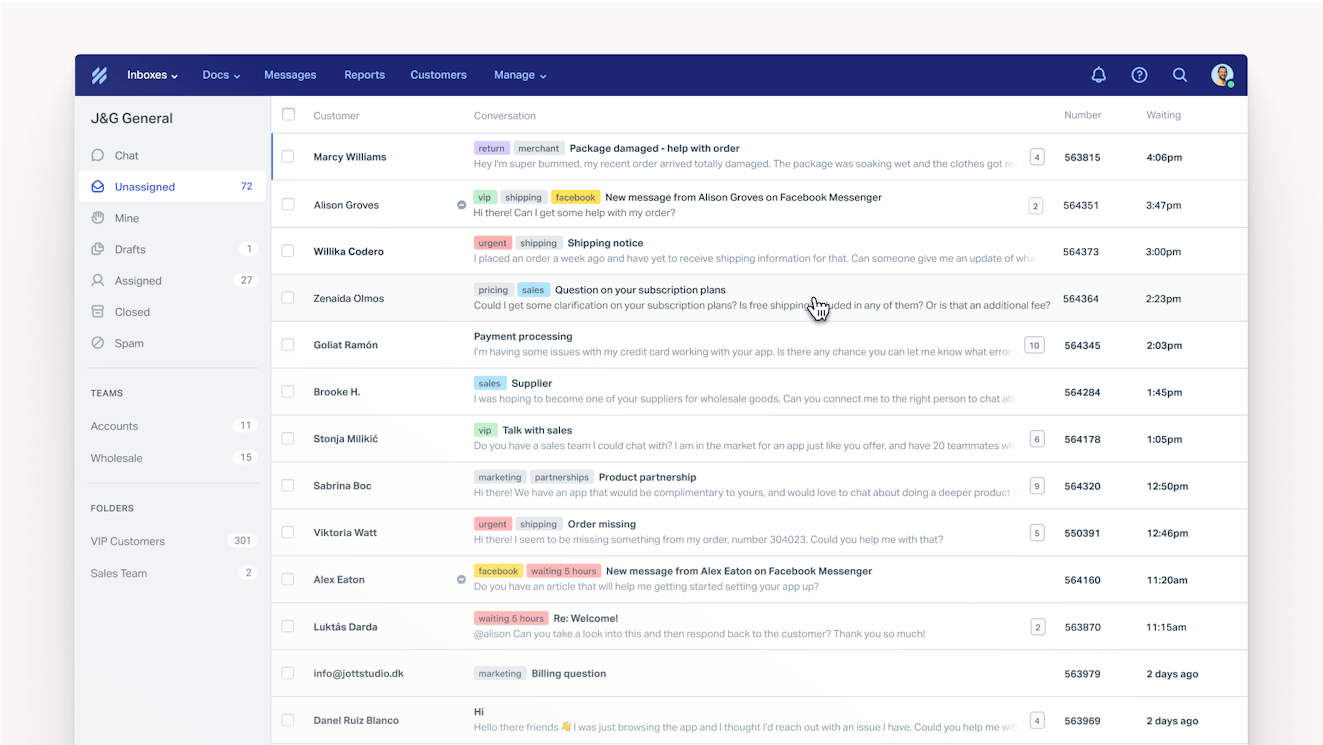
Working in Help Scout starts in its Inbox. Inbox houses all of your customer communications from all channels in one place. It's a one-stop shop for your entire support team with features that make it easy to collaborate and answer requests quickly.
Collision detection: See when someone else is already working on a request, and prevent duplicate responses from being sent to customers.
Routing: Use round-robin or load balanced routing to handle conversation assignments automatically so your team can stay focused on customers.
Saved replies: Reply to frequently asked questions in seconds with previously written, pre-vetted answers.
Snooze: Hide conversations in your inbox temporarily to get non-urgent requests out of the way or as a reminder to follow up with a customer at a later date.
Internal notes: Add comments that only your team can see to give teammates a heads-up on a conversation or provide helpful resources for new employees you're training.
@mentions: Tag teammates in internal notes to let them know you need their help or input.
Tags: Label conversations to quickly find them later or to run reports on topics you care about.
Workflows: Create if/then rules to automatically send requests to the right team, add internal notes or tags to conversations, close auto-reply emails, and more.
Custom fields: Create custom properties that can be used to route tickets via workflows or ensure you get all of the data you need to help customers.
Views: Filter your inbox to show only conversations that meet the conditions that are important to you (e.g., see only conversations with a VIP customer tag, customers that have been waiting for a reply for more than 24 hours, etc.).
Send later: Schedule replies to be sent at a time and date of your choosing — maybe at a more reasonable hour if you're working late at night or after a few hours when you expect an engineering bug will be resolved.
Every conversation you open in Help Scout also has a customer profile in the sidebar that shows information like the customer's company, email address, and location as well as any previous support conversations your team has had with that customer.
Knowledge base


Docs is Help Scout's knowledge base tool. You can use it to create a searchable customer help center by publishing articles and organizing them into collections and categories, making it easy for customers to find the answers they need quickly and on their own.
You can also use Docs to create an internal knowledge base that's only accessible to members of your support team, or you can create restricted Docs sites that can only be viewed by authenticated visitors.
However, customers don't have to visit your help center to get self-service support. Help Scout also offers Beacon — an embeddable widget that lets customers search your knowledge base for answers while they're browsing your website or using your product.
Live chat
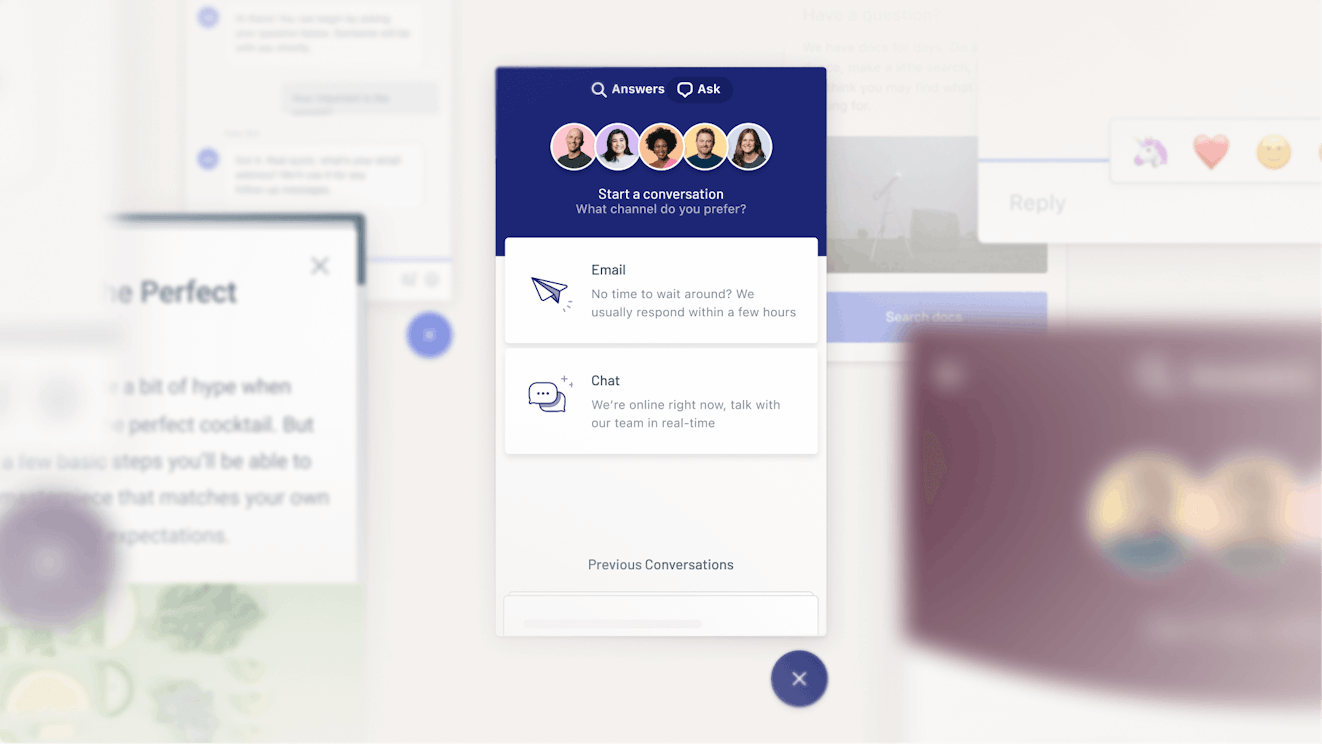
Beacon can also be used to offer live chat support to your customers. All live chat conversations flow into your shared inbox, and your team members can set their status to available or unavailable. When no one is available, the live chat option doesn't display for customers in your Beacon. You can also set a maximum number of chats that can be handed by any user at once.
When a customer starts a live chat with your team, you'll be able to quickly view details like which pages of your site/app they've viewed and what type of device, operating system, and browser they're using, which can be helpful for troubleshooting. Other helpful inbox features are also available for live chat, including saved replies, tags, and assignments.
AI chatbot
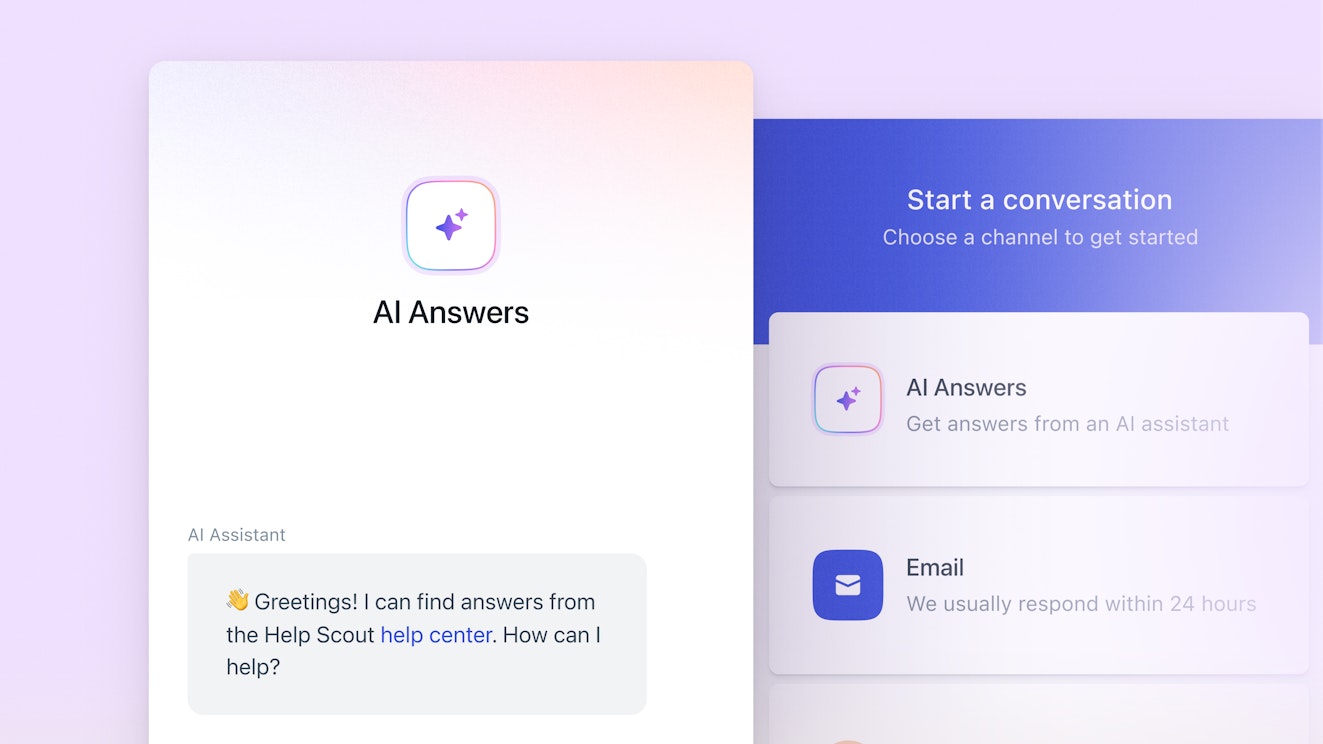
Another option you'll find in Beacon is AI Answers, Help Scout's AI-powered chatbot. Customers who want instant help can click AI Answers, ask their questions in natural language, and get an answer. AI Answers uses content from your knowledge base and any websites you add to provide answers that are accurate and use your brand's voice, so they sound like your team (not a robot) wrote them.
If customers can't get the answer they need from AI Answers, they can ask the chatbot to connect them to a human support rep, or they can simply toggle back to the Beacon's main view and choose between any of the other options you've set up — send you an email, start a live chat, or browse your knowledge base.
AI assistant

Help Scout's AI assistant features can be used to:
Draft a reply to a customer's email using knowledge from previous support replies and your help center. You get an accurate draft in seconds that you can review, edit if needed, and send.
Summarize lengthy back-and-forth email chains into an easy-to-read bulleted list so you can get up to speed on complex issues quickly.
Fix spelling and grammar issues, make content you've written shorter or longer, or translate what you've written into other languages with AI Assist. AI Assist is available to use on email replies, Docs articles, and live chat responses.
Integrations
Help Scout offers more than 100 integrations with the tools that customer service teams most often rely on to deliver quick and personalized support. You can connect to CRMs like Salesforce and HubSpot, ecommerce platforms like Shopify and WooCommerce, voice and SMS support providers like Aircall and Textline, and project management/issue tracking systems like Jira and Linear.
Pricing
Free plan and trial available. View Help Scout's current pricing.
Learn more about Help Scout:
2. Intercom – Best for teams that want to automate everything
While nearly every customer service platform on the market now offers AI features, Intercom is the only one that's gone all in on AI. It calls itself an "AI-first customer service platform," and AI is baked into nearly all of the software's features. It offers an AI agent (Fin), AI Copilot, an AI insights tool that can be used for analysis and reporting, and an AI CSAT tool that adds satisfaction scores to 100% of your conversations.
Fin can automatically reply to support requests received via any channel — email, live chat, social, SMS, and even phone or Slack. It can process both text and any images customers include (such as screenshots or invoices), and it can not only reply to questions but also update data in your help desk and other connected systems as needed (such as canceling an order in Shopify).
You train Fin on how to reply by giving it sources to learn from, which can include your previous support replies, your help center articles, data from connected third-party integrations, and other one-off documents you submit. You can also direct Fin on what to do with questions it can't answer on its own using Intercom's no-code workflow builder where you can set up routing trees for complex requests.
Fin can be used as a standalone AI chatbot (meaning you can use Fin but have a different help desk tool) or as part of Intercom's customer support suite. If you opt to go the support suite route, you'll also get access to tools for delivering support via email, chat, social, messaging channels, SMS, and voice.
It's worth noting that Intercom's pricing model is very nickel-and-dime-y. There's a base per-user cost for its support suite, but you'll pay additional per-resolution fees for its AI features, per-minute fees for phone support calls, and per-unit fees for SMS and WhatsApp messages. Additionally, most of its AI features (Copilot, CSAT, insights, and even Fin over phone and Slack) are sold as add-ons with additional per-user-per-month costs.
Pricing
Free trial available. View Intercom's current pricing.
Recommended Reading


3. Zendesk – Best for large teams that need deep customization
Zendesk does everything a help desk can do — email, phone, live chat, SMS, self-service, and social support — and has every feature within those tools you could ever want or need. It's a perfect option for teams with complex support operations at large companies with deep customization needs.
Zendesk's Sunshine™ gives you the ability to create custom applications that work inside of Zendesk. You can do things like embed shopping carts into your live chat conversations, integrate support natively into your mobile app, and build workflows that use not only the data available in Zendesk but also any other platform you use — Zendesk integrates with nearly 2,000 third-party applications.
Zendesk is also a good option, like Intercom, for teams looking to automate as much as possible. Its AI agents can answer customers' questions automatically on any channel, its AI Copilot helps agents write and do research, and it can even instantly turn a support reply into a help center article. Other AI features QA all conversations and provide insights or create schedules for your team using AI demand forecasting.
The upside to Zendesk's robustness as a platform is its flexibility, but the downside is its complexity. Customers report that it can take months to get set up on the platform, it's difficult to train agents how to use it, and taking advantage of many of its features requires development support. For large and enterprise teams, it's probably worth the trade-off, but this often makes it a less ideal solution for SMBs.
Pricing
Free trial available. View Zendesk's current pricing.
Recommended Reading

4. Gorgias – Best for ecommerce companies
Gorgias is one of only a handful of tools on the market that are fully focused on ecommerce customer service. It offers extensive integrations with the major ecommerce platforms — Shopify, BigCommerce, Magento, WooCommerce, and PrestaShop. Its Shopify integration is particularly deep, allowing you to see orders and take action on them without leaving Gorgias as well as access details like available inventory.
As far as its help desk, Gorgias supports all of the standard channels — email, chat, social, phone, and self-service. When customers reach out for help, a sidebar displays all of the information you need to reply, including previous conversations, orders, tracking numbers, reviews, and subscription details. You can also use rules to route tickets automatically and create reply templates and custom variables.
Gorgias also offers two AI agents: a shopping agent that helps visitors make purchase decisions, and a support agent that answers customers' questions for you. These agents don't work out of the box, however. You'll need to connect it to sources like your help center and Shopify store; provide it with guidance on your brand, policies, and data; then review its answers and provide feedback.
One thing to keep in mind is that while most customer support platforms have user-based pricing (pay based on the number of users you add to the platform), Gorgias has usage-based pricing (pay based on the number of requests you reply to). This can make your pricing less predictable from month to month or lead to major spikes in cost during busy holiday seasons or major sales.
If you prefer the stability of user-based pricing, there are some alternatives to Gorgias you can consider that are also very ecommerce-focused.
Pricing
Free trial available. View Gorgias' current pricing.
Recommended Reading

5. Front – Best for professional services
While the other customer service tools on this list help you manage team email addresses like support@ or help@, Front lets you manage both team and personal email inboxes. You get similar features in your personal inbox to those you would in a shared inbox — the ability to assign emails to other team members, to mention team members in private comments to get their help, or to share your entire inbox with a teammate temporarily.
This makes Front a great choice for agencies and consultancies with clients that have one primary point of contact at your business, such as an account manager. When someone on your team takes time off, you can simply grant access to their inbox to whoever's filling in to make sure client questions and requests continue to get addressed while they're out.
If your firm communicates with clients from a shared email address as well, your team can collaborate on those requests using features like message templates, collision detection, manual or automated assignments, and comments where you can @mention a teammate to request their help. You can even share emails with external collaborators — no account is needed — to get their input before replying.
If you have a small team (10 or fewer users) and only need to reply to clients via email (and maybe create a knowledge base), Front's base plan is an affordable option. However, its mid- and top-tier plans give you access to more typical help desk features like live chat, integrations with SMS and phone support providers, and social media integrations for Facebook Messenger, Instagram, X, and WhatsApp.
Pricing
Free trial available. View Front's current pricing.
Recommended Reading

6. Aircall – Best for call centers
If your team only offers phone support, Aircall is a good choice. It works on the cloud, so you don't need any hardware to use it. You can create local and international toll-free numbers, create direct extensions, and set up call routing via IVR so calls go to the right teams. Additionally, if you need to collaborate on calls, Aircall has a call conferencing feature for up to five people.
If you only offer phone support on certain days of the week or hours of the day, you can create schedules to dictate when calls are accepted. Outside of that schedule, calls are sent to voicemail so customers can leave you messages even when you're unavailable.
Other features include blocking numbers (prevent spam and bot calls), warm transfers (update another rep before transferring a call), call assignments and notes (for when you need someone who's not around to answer a customer's question), and queue callbacks (let customers request a return call instead of waiting on hold).
Aircall also offers voice AI agents that answer calls for you. They can answer routine questions or collect information from customers so when you pick the call up you have everything you need at hand to provide support quickly. Additionally, Aircall's copilot, AI Assist Pro, provides real-time coaching while agents are on calls and automatically scores all conversations based on your QA criteria.
Finally, if your team also offers other types of support, Aircall has integrations with many of the help desks on this list, including Help Scout, Intercom, Zendesk, Gorgias, and Front.
Pricing
Free trial available. View Aircall's current pricing.
7. Sprinklr – Best for high-volume social media support
Many of the platforms on this list integrate with a handful of social media sites for delivering support on those channels; Facebook Messenger, Instagram, WhatsApp, and X are common. However, if you're a large company with an active social media marketing team promoting your brand (or possibly multiple brands) across dozens of social sites, you'll likely need a more robust social support platform like Sprinklr.
Sprinklr is a customer experience tool that consolidates all of your social media operations into one platform. Marketing teams can use it to build and schedule campaigns, and support teams can use it to respond to customer requests received via social. It works across 43 different social media and messaging platforms, including ones you rarely find in other help desks like Reddit, Pinterest, LinkedIn, and YouTube.
Beyond managing conversations from social, Sprinklr is also a complete help desk product. You can use it to deliver email, live chat, and phone support as well as build a help center and community forum. Like the other platforms we've looked at, you can also use Sprinklr's AI Agents to respond to customer requests automatically and its Copilot to answer your team members' questions or get insights on your data.
One thing to keep in mind is that Sprinklr is targeted for the enterprise; its pricing isn't published, and it likely comes with a large price tag. That may be well worth it if your team is managing complex social media operations across lots of different sites and you want marketing and support to stay in sync.
However, other options are available if Sprinklr is outside of your price range. You could look for social media customer service software that includes integrations with the social channels you need to support, or you could opt to invest in a separate social media management platform like Sprout Social.
Pricing
No free trial offered. Contact Sprinklr for pricing.
8. HubSpot Service Hub – Best for sales-led companies
Service Hub is HubSpot's help desk tool. It's available in the same interface as the company's CRM and marketing automation tools (if you subscribe to those too), and all of the data from the systems is shared. This makes it ideal for sales-led companies where sales and post-sales (customer success or account management) teams need to collaborate closely to win and retain accounts.
From the help desk perspective, HubSpot has everything you need to manage your support operations. You can deliver email, live chat, Facebook Messenger, and phone support (SMS and Instagram options are also available, but only if you're also subscribed to Marketing Hub). All requests filter into your shared inbox, and you can use its Breeze Customer Agent to automatically reply to requests from any channel.
Where HubSpot really stands out, however, is with the customer success use case. Because Sales Hub and Service Hub are tightly integrated, CSMs will be able to see the entire history of interactions between the customer and sales, including all back-and-forth email exchanges, call recordings, and contracts. This makes it easier to prepare for kick-off calls and anticipate the types of questions you'll receive.
There's also a customer success workspace where you can quickly monitor your entire book of business. Setting up health scores makes it easy to identify happy customers and churn risks at a glance. Just decide which types of interactions should add to or reduce a health score, and HubSpot will automatically adjust health scores as those types of interactions take place.
Finally, if you build custom documents and training materials for your clients, you can also use Service Hub to create customized portals for your different customers. Simply add any documentation you want them to be able to refer to, and set up your access permissions. Customers can also create tickets in the portal so both you and they can see all of the requests from their team in a single place.
Pricing
Free plan and trial available. View HubSpot's current pricing.
Recommended Reading


9. Gmelius – Best for small businesses
Gmelius is a great option for small businesses that have been using Gmail for customer support and are looking to upgrade to a system that's not going to have a huge learning curve. It sits on top of Gmail and gives you lots of the types of collaboration features that support teams need as they grow.
Create a shared inbox for an email address like support@, then select which of your Google Workspace users should have access to that inbox. Collision detection alerts let team members know which requests are already being worked on so you can avoid duplicate effort (and replies), and internal notes and @mentions let teams communicate privately about requests when needed.
If you need more advanced features, Gmelius has those, too. You can assign specific requests to the team members best equipped to answer them, set up round-robin to avoid cherry-picking in the queue, and set SLAs for target response times. Gmelius even has some AI features that will write draft responses for you and automatically sort, categorize, and route incoming requests.
Keep in mind, however, that Gmelius only works for email support; it doesn't give you the ability to manage requests from other channels or build a help center. Still, if you're managing support for a small business, have no immediate plans to add new support channels, and want a system that's easy for others to use without much (or any) training, it's a great, affordable option.
Pricing
Free trial available. View Gmelius' current pricing.
Recommended Reading

10. Chatwoot – Best open-source customer service software
Chatwoot is perfect if you're looking for an open-source support tool that you can self host. It's regularly maintained — there's been a new release or hotfix added to the project's source code at least once a month for the last two years — and more than 300 people have contributed to its code on GitHub.
Out of the box, Chatwoot comes with all of the features you'd expect to see in support software: a shared inbox, knowledge base, live chat, and social integrations with Facebook, WhatsApp, Instagram, Slack, Telegram, and LINE. View reports showing things like channel volume, agent performance, and CSAT scores, and access the platform's audit logs to see who made specific changes in the tool.
Productivity and collaboration features you'll find in Chatwoot include canned responses, private notes, workflows, tags, and teams. There's also an AI chatbot called Captain that answers customers' questions automatically and a copilot that will write suggested replies to questions for you.
Chatwoot isn't the only open-source customer support platform on the market — other options include osTicket and UVdesk. However, both of those platforms only let you manage email requests, so if you plan to deliver multi-channel support, Chatwoot is your best option.
Pricing
Free plan available. View Chatwoot's current pricing.
11. Jira Service Management – Best for IT teams
Jira Service Management is an ITSM platform that helps you consolidate all of your service operations into a single tool, making it easier to align the efforts of IT, development, and customer support teams. While it can be used for customer support, it's much more suited for IT support, DevOps, and IT operations teams.
Jira Service Management comes with all of the key features you'd expect to find in a service desk, including a request portal, knowledge base, SLAs, and asset tracking. You can also code your own intake forms and workflows or access libraries of hundreds of pre-built, no-code templates, and Jira's robust API lets you pass data to and from any other platform you need to connect with.
For DevOps teams, you can link tickets to issues reported in Jira (Atlassian's bug tracking software) as well as manage incidents, aggregate product requests, and group similar incidents and bugs together as problems. IT operations teams can use it to manage change requests, prevent incidents, monitor new releases, and create on-call schedules.
Finally, Jira Service Management's automation features help IT teams speed up their work. You can automatically reply to support questions using AI-generated answers that are trained on your knowledge base; triage, assign, summarize, and prioritize tickets; and detect priority alerts, identify the right person to fix the issues, and write post-incident reviews.
Pricing
Free plan and trial available. View Jira Service Management's current pricing.
Recommended Reading

12. Agentforce Service – Best for enterprise companies
Agentforce Service (formerly Salesforce Service Cloud) is a good fit for enterprise companies, particularly if you're already using Salesforce for customer relationship management. While it's one of the most expensive options on the market, the cost gets you access to an incredibly robust suite of tools that includes everything from omnichannel support to field service management and asset tracking.
Agentforce Service includes lots of features you won't find in other help desks. In addition to omnichannel support tools, you'll get incident detection, diagnostic tools, broadcast communications, and asset tracking. Its field service management features include dispatch and scheduling tools, work order management, and a mobile app to help your technicians in the field.
There are also a variety of AI tools in the platform to help you expedite your customer service operations. You can use its chatbot to automatically reply to customer questions and requests, turn support conversations into knowledge base articles automatically, create action plans for agents so they know how to handle requests, and route requests to the right person or team.
Agentforce's AI tools also use its Einstein Trust Layer to make sure the AI never shares private data, and you can set up specific rules for the types of queries that should always be routed to a human support agent. You can even select which specific LLM the platform relies on for its AI features — use one of Salesforce's shared LLMs, choose from a selection of third-party LLMs, or even bring your own model.
Pricing
Free trial available. View Agentforce Service's current pricing.
Customer service software buying guide
Need more general information about customer service software before you can make a decision on which tool to buy? We have you covered. Below, we dig into which types of tools are available, which benefits to expect from them, which features to look for, and how to make the right choice.
What is customer service software?
Customer service software is a system that businesses use to track, manage, and resolve customer issues. It helps teams organize requests received from multiple channels, reply to those requests more quickly, and access the data they need to deliver personalized support.
Terms like "help desk software," "ticketing system," and "service desk software" are also commonly used to refer to tools in the customer service software category. However, "help desk" more often refers to tools that help teams support external customers, while "service desk" generally refers to tools that help teams support internal customers. "Ticketing system" can be used to describe tools built for either use case.
The benefits of using customer service software
Using customer service software delivers a lot of benefits. It allows you to:
Give more responsive and more consistent support. Features like automated workflows, ticket tagging, knowledge base integration, saved replies, and AI help your team spend more time helping customers and less time fighting their tools.
Gather customer insights. Easily identify, collect, and organize customer feedback, feature requests, bug reports, and use cases so they can be used to improve your product/service and increase customer satisfaction.
Work better together. Customer service software helps you prevent duplicate work, keep track of customer queries, coordinate a response across multiple teams, and deliver up-to-date answers.
Analyze and report. Use the built-in reporting features of customer support software to understand changes in support volume, team productivity, type and size of customer, and more.
Scale up your service. Maintain high-quality service as you grow by using tools that can coordinate multiple teams of agents to support an enormous customer base via organizational features, automation, and third-party integrations.
When you have more than a couple of people working together to support customers, upgrading to a dedicated customer service platform is the right choice.
Key features to look for in customer service tools
While there are a lot of niche features your team may need based on your specific industry and workflows, there are a handful of must-have features you should look for in any platform you're considering.
Support for the channels you offer: If you offer your customers email, live chat, and social support, look for platforms that offer features for managing requests on all of those channels. Having everything come into a single system is simpler than integrating with (and paying for) multiple tools that are focused on single support channels.
Ticket management: Ticket management features take all of your incoming communications and organize them, helping you prioritize and route requests more easily. Look for platforms with universal inboxes, workflows, custom fields, ticket tagging, and customizable views.
Team collaboration: Collaboration features allow multiple agents to work together on incoming requests. Look for platforms that let you create different teams, assign conversations to individual agents, write private notes on conversations, mention teammates on tickets, and alert you if someone else is already responding.
Self-service channels: Self-service features let your customers find answers to their questions on their own without having to contact your support team. Look for platforms that let you create a knowledge base or launch an AI-powered chatbot.
Automation: Automation features let technology handle the rote work for you so you can focus on the requests that need a human touch. Look for platforms with AI agents that answer simple FAQs and copilot features that write draft replies, translate responses into different languages, or route requests to the right teams.
Integrations: Integrations make it simple to connect your support platform to the other tools you use to help customers. Look for integrations with your CRM, ecommerce platform, billing software, bug-tracking software, and any other tools that house the customer data you'll need to deliver personalized support.
Reports and analytics: Features for reporting and analysis allow you to better understand things like what times of day and days of the week you get the most requests, how satisfied your customers are with the support they received, and more. Look for systems with both pre-built reports and the ability to create custom reports for the data you need.
How to choose the right customer service software for your team
Buying customer service software might seem like a simple task on the surface, but once you start getting into the weeds, it can quickly become overwhelming. Here are some tips on how to best approach the process to make it as painless as possible.
Decide what you're looking for in a support tool
It’s hard to find the right tool if you don’t know what you’re looking for. For teams searching for their first support tool, think about your current needs as well as your projected future needs.
For example, you may only plan on offering email support initially, but you know within the next year you want to add chat support. Since you don’t want to switch tools every few years, it’s good to try to anticipate those future needs.
If you’re switching from a current tool to a new one, it may seem like you’re best served focusing on where your current tool is lacking, but that could be a mistake. Though you do want to address any deficiencies, you also need to list out what’s working well in your current tool. If not, it’s possible you’ll end up just trading one problem for another.
Determine how urgent your need is
It’s nice to envision a world where you have all the time you need to take trials of software, sit in on demos, and gather every detail. However, that’s rarely reality. When you’re starting your search, it’s important to be very honest with yourself about how much time you actually have to find a solution.
However long you think it’s going to take to find a tool, double that timeframe. That may sound extreme, but it’ll help you set expectations for others (and if you finish early, chances are people won’t be upset!).
If you know you need a tool quickly, you should have fewer initial tools to review. If you have a little more time, you can have a larger base pool of tools to look at and can schedule more demos.
Consider other constraints you might have
In addition to time, there are other constraints to consider as well. For example, many teams have some level of budget constraint. Though some may have a blank check, it’s hardly the norm.
Another aspect to think about is any constraint you have as it relates to connecting to other tools. For example, if you’re currently using a certain CRM, you probably need a support tool that integrates directly with it. It’s important that any new tool you invest in fits well with your current software stack.
Create a short list of support tools to consider
Once you know what you're looking for, how much time you have to make a decision, and what constraints you're working with, you’ll want to put together a short list of potential tools to consider.
As with any purchase, a great place to start is reading reviews. Sites like G2 and Capterra are great resources to see how current customers feel about the tools you're considering.
After reading reviews, consider reaching out to other support professionals in your network to see if they have any additional insights or tool suggestions to offer.
Outside of personal connections, you can also check out different online communities to source some more perspectives. A community like Support Driven can give you access to a large number of support professionals who may be able to further aid you in your search.
Evaluate the tools on your short list
Once you have a short list of tools you want to consider, you need to dive deeper to better understand each offering and how well it matches up with your needs. Things like demos with a salesperson and hands-on experience with a product are helpful in fully understanding any software you’re considering.
During a demo, ask all the questions you need answered. Salespeople know their products very well, so don’t shy away from using them as a resource.
Additionally, many support tools offer the ability to try the product for free, and this is something you should absolutely do. Since it’s a bit more involved, chances are you’ll want to limit the number of trials you pursue. Research shows having too many options makes us more indecisive and less satisfied with our final choice, so you should keep your number of trials lower — probably around three to four options.
Submit a support request
One last thing you can do is actually reach out to the support teams for the final contenders with a few questions. By doing so, you’ll get a better idea of the level of support they offer and what you can expect if you decide to become a customer.
Decide which tool is right for your team
If possible, consider taking a week-long break after your final demo call or trial to ensure you’re able to look at things with fresh eyes. If there were others involved in the process, this is a good time to meet up and compare notes. It’s very possible you may have a bias toward a certain tool. By engaging with other opinions, you’ll limit the effects of any bias you may have.
Buying support software can be a big undertaking, but it shouldn't be something you dread. When you plan ahead and are thoughtful about the process upfront, you’re able to limit some struggles and set expectations for yourself and others. Keep an open mind, seek diverse opinions, and adjust your expectations accordingly, and you’ll be set.